Back to: ASIS PSP – Preparation Course
Lesson 4.2: Video Surveillance Systems (VSS)
Objective: By the end of this lesson, you will be able to apply the DORI standard to define resolution requirements, explain the “PTZ Trap,” calculate storage needs based on compression and frame rate, and distinguish between Fixed, Varifocal, and Multisensor cameras.
1. Terminology: CCTV vs. VSS
While “CCTV” (Closed Circuit Television) is the common term, the industry and ASIS standards now prefer VSS (Video Surveillance Systems). Modern systems are rarely “closed”; they are networked, IP-based, and integrated.
The Functional Goal:
Video is used for three distinct purposes:
- Surveillance: Watching an area (Real-time).
- Assessment: verifying an alarm (e.g., A door alarm trips, the guard looks at the camera to see if it’s a thief or just the wind).
- Forensics: Investigating an event after the fact (Recorded evidence).
2. The DORI Standard (IEC 62676-4)
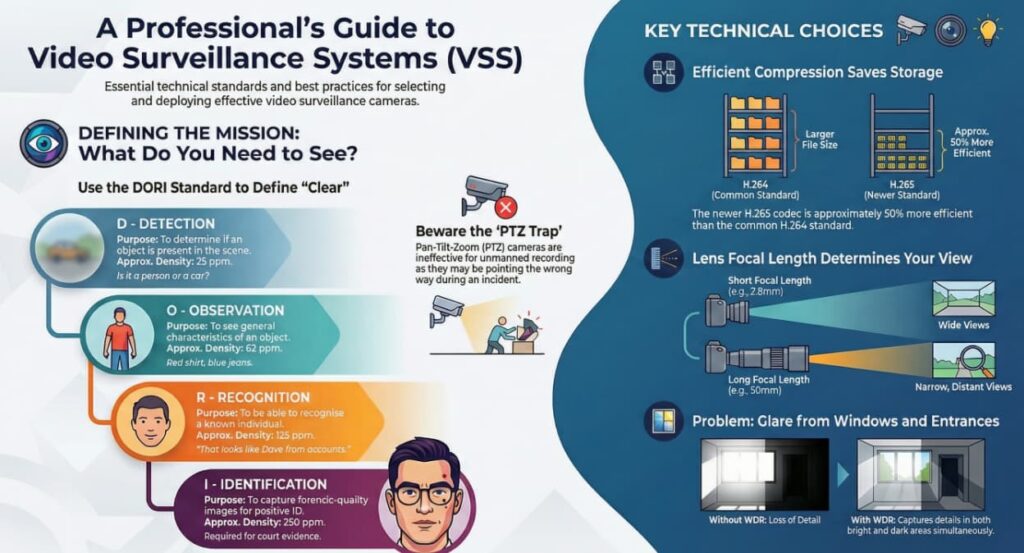
You cannot simply say “I want a clear picture.” You must define “How clear?” using the DORI standard. This links the Pixels on Target to the operational purpose.
| Level | Definition | Purpose | Approx Density (Pixels/Meter) | Approx Density (Pixels/Foot) |
| Detection | Something is there. | Is it a human or a dog? | 25 ppm | 8 ppf |
| Observation | General characteristics. | Red shirt, blue jeans. | 62 ppm | 19 ppf |
| Recognition | You know who it is if you know them. | “That looks like Dave from accounting.” | 125 ppm | 38 ppf |
| Identification | Positive ID for court. | Facial features clearly visible. | 250 ppm | 76 ppf |

Exam Tip: If the requirement is “Facial Recognition” or “License Plate Reading,” you generally need Identification level density (approx. 75-80 ppf).
3. Camera Types and Applications
A. Fixed Cameras
- Description: Points in one direction.
- Pro: Reliable, always recording the target area.
- Con: Limited field of view.
B. PTZ (Pan-Tilt-Zoom)
- Description: Can move and zoom in.
- The “PTZ Trap” (Critical Concept):
- PTZs are great for live monitoring (a guard following a suspect).
- They are terrible for unmanned recording. If the camera is looking Left, and the crime happens on the Right, you missed it.
- ASIS Rule: Never use a PTZ as a primary alarm assessment tool unless it is automated to snap to the alarm location (Presets).
C. Multisensor / Panoramic (180° / 360°)
- Description: Multiple lenses in one housing or a “Fisheye” lens.
- Pro: Situational awareness. Replaces multiple fixed cameras.
- Con: Fisheye images are distorted and require “dewarping” software.
D. Thermal Cameras
- Technology: Detects heat (infrared radiation), not visible light.
- Best Use:
- Perimeter protection in total darkness.
- Long-range detection (can see a human at 1km+).
- Not affected by fog, smoke, or shadows.
- Limitation: Cannot see through glass (glass blocks thermal energy). Cannot identify faces (only heat signatures).
4. Lenses and Optics
The lens determines what the camera sees.
Focal Length (mm)
- Short Focal Length (e.g., 2.8mm): Wide view, shorter distance. (Use for lobbies, small rooms).
- Long Focal Length (e.g., 50mm): Narrow view, acts like a telescope. (Use for long corridors, fence lines).
Varifocal vs. Fixed Lens
- Fixed: The focal length is set at the factory. Cheaper, but inflexible.
- Varifocal: The installer can zoom in/out manually during installation to frame the perfect shot.
Iris
- Auto-Iris / P-Iris: Automatically adjusts the opening to control how much light enters. Essential for outdoor cameras where light levels change from noon to midnight.
5. Video Compression (Bandwidth Management)
Raw video is too big to stream. We use “Codecs” to compress it.
A. How Compression Works (Inter-frame)
The camera doesn’t send 30 full pictures per second.
- I-Frame (Key Frame): A full, complete picture. (High bandwidth).
- P-Frame (Predictive): Only records the changes from the previous frame. (Low bandwidth).
- Example: If a camera stares at an empty hallway, the P-frames are tiny. If a person walks in, the P-frames get bigger.
B. Common Codecs
- H.264 (AVC): The industry standard for years. Good balance.
- H.265 (HEVC): The newer standard. Compresses 50% more efficient than H.264. (Saves hard drive space, but requires more processing power).
- MJPEG: Old school. Every frame is a full picture (I-Frame). Huge bandwidth, but best quality for frame-by-frame analysis.
6. Storage Calculations
You must know the four variables that drive storage costs (Hard Drive size).
- Resolution: Higher resolution (4K) = More data.
- Frame Rate (IPS/FPS): Images Per Second.
- Hollywood/TV: 24-30 fps.
- Standard Security: 10-15 fps is usually sufficient.
- Casinos: 30 fps (required to see card tricks).
- Retention Time: How long do we keep it? (30 days? 90 days?).
- Scene Activity (Motion): Because of compression (P-Frames), a busy lobby takes up more storage than an empty warehouse, even at the same settings.
Formula Logic:
Storage approx Bitrate x Cameras x Days x 24h
7. Lighting Issues (WDR)
Wide Dynamic Range (WDR): A critical feature for cameras facing windows.
- The Problem: The sun outside is bright; the room inside is dark. A normal camera will either silhouette the person (black figure) or wash out the window (white square).
- The Solution: WDR takes two exposures (one short, one long) and combines them to see details in both the bright and dark areas.
Real world tip: The “Spider Web” Effect: IR (Infrared) illuminators on cameras attract bugs because bugs like heat. Spiders build webs across the lens to catch the bugs. The IR light reflects off the web, blinding the camera at night.
- Tip: disable the on-camera IR and use a separate, external IR illuminator mounted 3 feet away. The bugs go to the external light, keeping your lens clear.