Back to: ASIS PSP – Preparation Course
0
Lesson 5.4: Training and Operations
Objective: By the end of this lesson, you will be able to differentiate between System Administrator and System Operator training, structure effective Post Orders vs. Standard Operating Procedures (SOPs), and implement a “Job Aid” strategy to reduce operator error.
1. The Training Hierarchy
Not everyone needs to know everything. Effective training is tiered based on the user’s role.
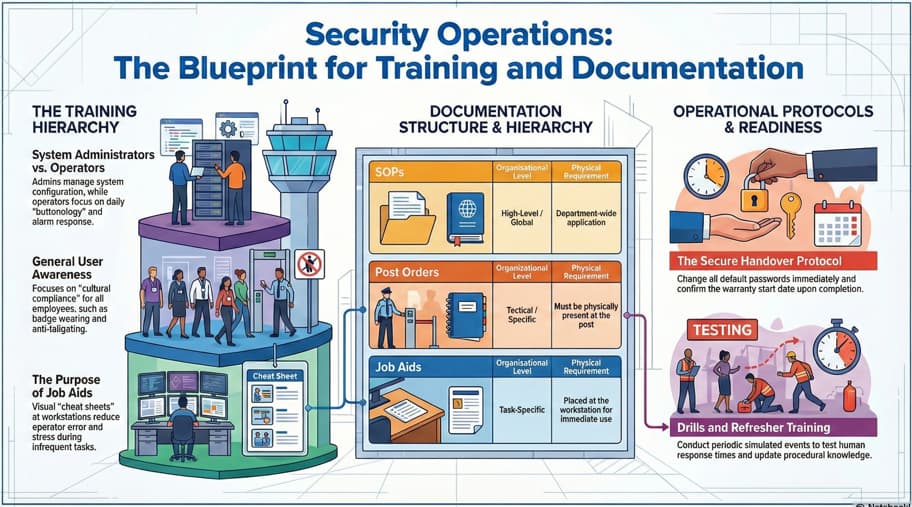
A. System Administrator (“Super User”) Training
- Target Audience: The Security Manager, IT Liaison, or Lead Supervisor.
- Scope: Database management and configuration.
- Adding/Deleting cardholders.
- Changing door time schedules (e.g., “Unlock for the Holiday Party”).
- Backing up the database.
- Troubleshooting offline devices.
- Goal: Full system mastery.
B. Operator Training
- Target Audience: Security Officers (Guard Force), Receptionists.
- Scope: Daily operations and “Buttonology.”
- How to acknowledge and clear an alarm.
- How to control a PTZ camera.
- How to print a visitor badge.
- Goal: Operational competence and speed.
C. General User Awareness
- Target Audience: All employees.
- Scope: Cultural compliance.
- “Don’t tailgate.”
- “Don’t prop doors open.”
- “Wear your badge at all times.”
2. Documentation: SOPs vs. Post Orders
The PSP exam expects you to know the hierarchy of written instructions.
A. Standard Operating Procedures (SOPs)
- Level: High-level / Organizational.
- Content: General instructions that apply to all posts or the whole department.
- Example: “The procedure for handling a Bomb Threat.” (This procedure is the same whether you are at the Front Desk or the Loading Dock).
B. Post Orders
- Level: Specific / Tactical.
- Content: Instructions specific to one location.
- Example: “The Front Desk Officer checks bags. The Loading Dock Officer checks manifests.”
- Requirement: Post Orders must be physically present (hard copy or digital) at the post. If a relief guard covers the spot, they should be able to read the orders and do the job immediately.
3. Job Aids (Cheat Sheets)
Training fades; Job Aids remain.
- Definition: Simple, visual tools placed at the workstation to help operators perform complex or infrequent tasks.
- Examples:
- A laminated card next to the keyboard listing the “Top 10 CCTV Shortcuts.”
- A flowchart on the wall titled “What to do if the Fire Alarm rings.”
- Value: Reduces stress and error rates during emergencies.
4. The Handover (Transfer of Ownership)
The project isn’t done until the keys (and passwords) are handed over.
- The “Keys to the Kingdom”:
- Master Keys: Physical keys for the cabinets/panels.
- Admin Passwords: The root passwords for the servers and cameras.
- Security Risk: The first thing the PSP must do upon handover is change the default passwords (e.g., changing “admin/1234” to a secure passphrase).
- Warranty Activation:
- The warranty clock usually starts on the day of Substantial Completion (Handover), not the day you bought the equipment.
5. Drills and Testing
Training is not a “one-and-done” event.
- Drills: Simulated events to test the human response.
- Example: Trigger a door alarm and time how long it takes the guard to notice it on the screen and radio a response.
- Refresher Training: Mandatory periodic retraining (e.g., every 6 or 12 months) to handle software updates or new procedures.