Back to: ASIS PSP – Preparation Course
Objective: By the end of this lesson, you will be able to compare maintenance contract types (T&M vs. Full Service), calculate reliability metrics (MTBF vs. MTTR), and develop a lifecycle plan for equipment obsolescence.
1. Types of Maintenance
Not all maintenance is the same. You must choose the strategy that fits the criticality of the asset.
A. Corrective Maintenance (Remedial / “Break-Fix”)
- Definition: You wait until the device fails, then you fix it.
- Pros: Zero cost until something breaks.
- Cons: Unpredictable downtime. High “emergency” labor rates.
- Best For: Non-critical assets (e.g., a camera in a janitor closet).
B. Preventive Maintenance (PM)
- Definition: Scheduled inspections and servicing to prevent failure.
- Activities:
- Cleaning camera domes (dirt reduces image quality).
- Testing battery load on UPS systems.
- Tightening door hinges.
- Vacuuming dust out of server fans.
- Best For: Critical assets (e.g., Main Server, Perimeter Intrusion sensors).
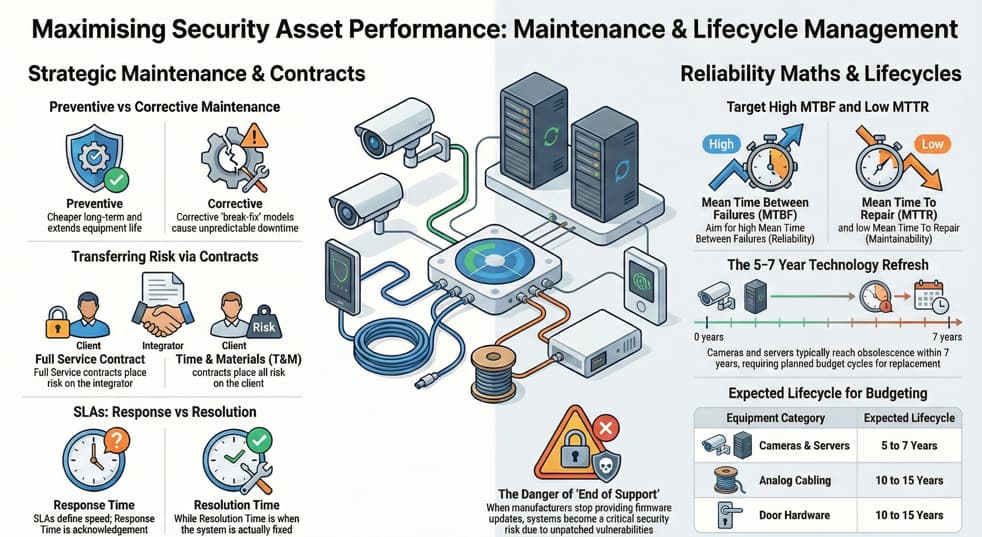
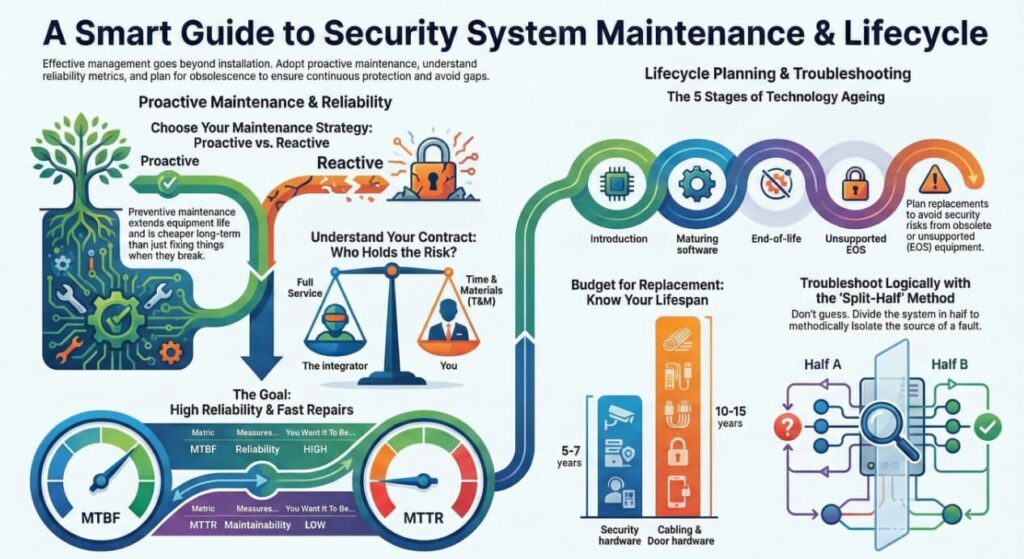
- ASIS Rule: PM is cheaper in the long run than Corrective Maintenance because it extends the life of the equipment.
2. Maintenance Contracts & SLAs
Once the warranty expires (usually 1-3 years), you need a contract with an integrator.
A. Contract Types
- Full Service (Comprehensive): You pay a flat annual fee. The integrator covers all parts and labor.
- Risk: The Integrator takes the risk. (Like health insurance).
- Time and Materials (T&M): You pay nothing upfront. When something breaks, you pay for the technician’s hourly rate + the cost of the part.
- Risk: The Client takes the risk.
B. Service Level Agreements (SLA)
The SLA defines the “Speed” of the response.
- Response Time: How long until the technician acknowledges the issue or arrives on site (e.g., “4 hours”).
- Resolution Time: How long until the system is fixed (e.g., “24 hours”).
- Note: Critical systems (Data Centers) often demand 2-hour response times.
3. Reliability Metrics (The Math of Failure)
You need to measure how reliable your hardware is.
A. MTBF (Mean Time Between Failures)
- Definition: The average time a device runs before it fails.
- Significance: A measure of Reliability.
- Example: A camera with an MTBF of 100,000 hours is more reliable than one with 50,000 hours.
- Formula: Total Uptime / Number of Failures.
B. MTTR (Mean Time To Repair)
- Definition: The average time it takes to fix the device once it has failed.
- Significance: A measure of Maintainability (and the efficiency of your vendor).
- Goal: You want High MTBF and Low MTTR.
C. Availability
The percentage of time the system is operational.
Availability = MTBF/(MTBF + MTTR)
4. Lifecycle Planning (Obsolescence)
Security technology ages like milk, not wine. You must budget for replacement.
The Lifecycle Stages
- Bleeding Edge: New, untested, expensive technology. (High Risk).
- Leading Edge (State of the Art): Proven, modern standard. (Best for new installs).
- Legacy: Older, but still functional. Parts are hard to find.
- Obsolete (End of Life – EOL): Manufacturer stops selling it.
- End of Support (EOS): Manufacturer stops providing firmware updates or tech support. Security Risk: Unpatched vulnerabilities.
Budgeting Rule: Physical Security equipment typically has a lifecycle of 5 to 7 years (Cameras/Servers) or 10 to 15 years (Analog Cabling/Door Hardware).
5. Troubleshooting Methodology
When things break, the PSP uses a logical process, not guesswork.
The “Split-Half” (Divide and Conquer) Method
If a camera image is blank, do not just replace the camera. Split the system in half to find the fault.
- Check the Midpoint: Is the signal reaching the patch panel/switch?
- If Yes: The problem is between the switch and the server.
- If No: The problem is between the camera and the switch.
- Repeat: Split the remaining section in half again.
Root Cause Analysis (RCA)
Don’t just fix the symptom; fix the cause.
- Symptom: The fuse blew.
- Fix: Replace fuse. (Bad approach).
- Root Cause: There is a short circuit in the wiring causing the fuse to blow. (Correct approach).