Back to: ASIS PSP – Preparation Course
Objective: By the end of this lesson, you will be able to distinguish between low-level (Hardwired) and high-level (API) integration, identify common industry protocols (ONVIF, BACnet), and explain the functional role of a PSIM in a converged security environment.
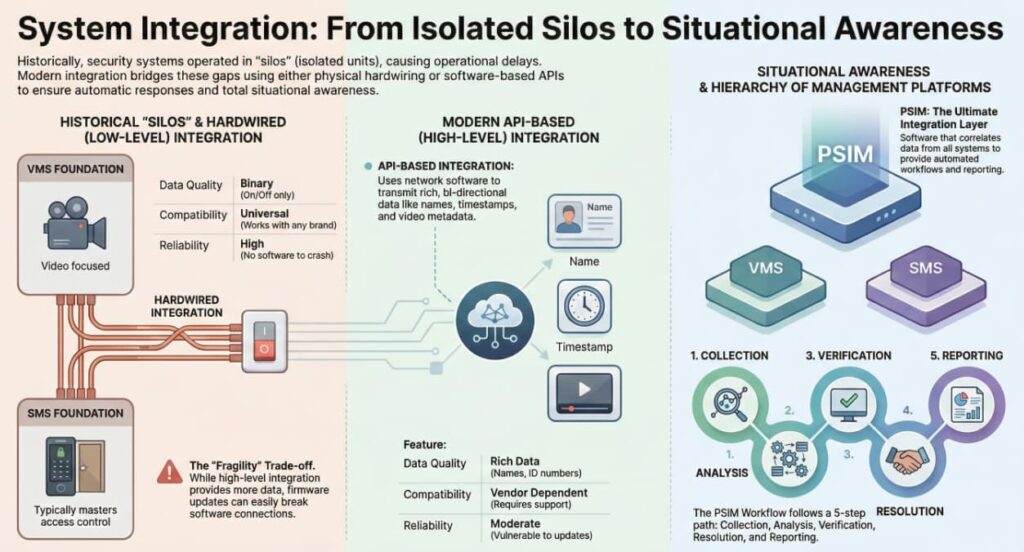
1. Why Integrate? (The Operational Benefit)
Historically, security systems were “Silos.” The Video system didn’t know the Alarm system existed.
- The Silo Problem: If a burglar alarm went off, the guard had to look at the alarm panel to see “Zone 4,” then physically turn to the CCTV keyboard and type in “Camera 4” to see what was happening. This delay causes errors.
- The Integration Goal:Situational Awareness.
- Scenario: The alarm trips. The system automatically pops up the correct camera on the video wall, turns on the lights in that zone, and unlocks the path for the response team.
2. Low-Level vs. High-Level Integration
There are two primary ways to connect systems. You must know the pros and cons of each for the exam.
A. Hardwired Integration (Dry Contacts / I/O)
This is the “Old School” method, but it is still the most reliable. It uses physical copper wires connecting an Output Relay on System A to an Input Zone on System B.
- How it works:
- Dry Contact: A switch that has no voltage of its own. It simply opens or closes a circuit.
- Example: When the Fire Alarm triggers, a relay opens. The Access Control Panel sees this open circuit and cuts power to the MagLocks.
- Pros:
- Universal: Works with any brand. (A relay is a relay).
- Reliable: No software drivers to crash; no network lag.
- Cons:
- “Dumb” Data: It is binary (On/Off). It cannot transmit details.
- Result: The video system knows “The Door Forced Alarm is Active,” but it does not know “John Smith caused it.”
- Scalability: Requires running physical wires for every single event you want to trigger.
- “Dumb” Data: It is binary (On/Off). It cannot transmit details.
B. High-Level Integration (Data / API)
This uses the network (Ethernet) and software to communicate.
- How it works:
- API (Application Programming Interface): Software code that allows two applications to talk.
- SDK (Software Development Kit): A toolset provided by a manufacturer to allow developers to write that integration.
- Pros:
- Rich Data: Transmits names, card numbers, time stamps, and video metadata.
- Bi-Directional: System A can control System B, and vice-versa.
- Cons:
- Fragile: If the firmware on the camera is updated, it might break the integration with the VMS.
- Vendor Dependent: Brand A must officially support Brand B.
3. Common Interoperability Protocols
To solve the “Vendor Lock-in” problem, the industry uses standard languages.
- ONVIF (Open Network Video Interface Forum):
- The global standard for Video.
- Profile S: Basic video streaming.
- Profile T: Advanced video streaming (H.265).
- Profile G: Edge storage/recording.
- Exam Tip: If a camera is “ONVIF Compliant,” it can connect to almost any VMS.
- BACnet / Modbus:
- The standards for Building Automation (HVAC, Elevators, Lighting).
- Use Case: Security system tells the HVAC to turn off ventilation if a chemical sensor trips.
- Active Directory (LDAP):
- The standard for IT Identity.
- Use Case: Integrating Access Control with HR. When HR disables a user in Windows, their badge is automatically revoked.
4. The Hierarchy of Management Platforms
As systems get larger, we need software to manage the noise.
A. VMS (Video Management System)
- Focus: Video.
- Integration Level: Basic. Can usually accept simple alarm inputs (e.g., pop up video on door alarm), but it is video-centric.
B. SMS (Security Management System)
- Focus: Access Control.
- Integration Level: Moderate. Usually acts as the “Master” for video and intrusion.
C. PSIM (Physical Security Information Management)
- Focus: Data Correlation.
- What it is: A software layer that sits on top of the VMS, ACS, Fire, and GIS (Mapping) systems.
- The Workflow:
- Collection: Aggregates data from disparate systems.
- Analysis: Correlates events (e.g., “Fire Alarm” + “Chemical Sensor” + “Wind Direction”).
- Verification: Shows video to the operator.
- Resolution: Displays a step-by-step Standard Operating Procedure (SOP) on the screen for the operator to follow.
- Reporting: Logs every click for compliance.
5. Logical/Physical Convergence
This is the modern frontier of the PSP exam.
- Identity Management (IdM):
- Moving away from manual data entry.
- One Identity: The concept that “John Smith” is one entity. His physical badge and his computer login are linked.
- PIV (Personal Identity Verification):
- Federal standard (FIPS 201) used in US Government. A smart card that grants both physical access (Door) and logical access (Computer).
Real world tip: The “Finger Pointing” Game: When the integration fails, the Camera vendor blames the Network, the Network guy blames the Access Control vendor, and the Access Control vendor blames the Camera.
- Tip: As the PSP, you must host a “all-hands” meeting. Don’t let them leave the room until they prove whose packets are dropping.