Back to: Data Center Physical Security Professional
Lesson 4.3: Storage & Retention1. Learning Objectives
By the end of this lesson, you will be able to:
- Calculate video storage requirements based on Resolution, Frame Rate (FPS), and Retention Period.
- Compare the efficiency of H.264 vs. H.265 compression codecs.
- Explain the importance of RAID (Redundant Array of Independent Disks) levels 5 and 6 for data protection.
- Define retention standards for compliance (e.g., PCI-DSS 90-day rule).
2. The Storage Formula
How many Hard Drives do you need to buy? The answer depends on four variables.
Storage = (Bitrate x Cameras x Days x 24 hours) / 8
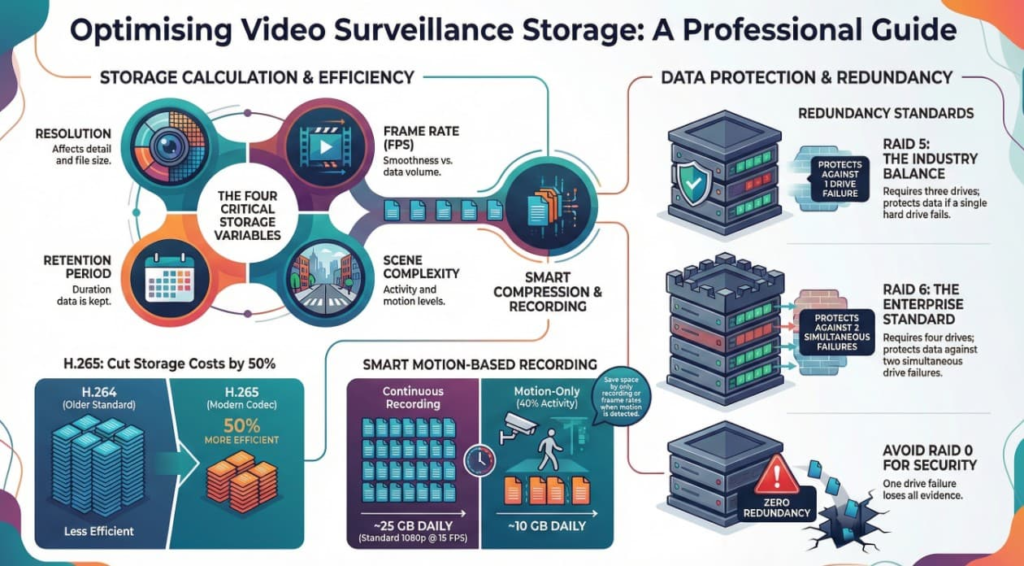
- Resolution: 4MP takes up twice as much space as 1080p (2MP).
- Frame Rate (FPS):
- 30 FPS: “TV Quality.” Smooth motion. (High Storage).
- 15 FPS: Standard Security. Good enough to see walking speed. (50% less storage than 30 FPS).
- 7 FPS: Low Motion. Often used for hallways at night.
- Retention Period: How long must you keep the video? (30 days? 90 days?).
- Scene Complexity (Motion): A busy lobby generates more data than an empty warehouse because compression algorithms save data by ignoring static backgrounds.
Rule of Thumb:
For a standard 2MP (1080p) camera recording at 15 FPS using H.265:
- ~25 GB per day (Continuous recording).
- ~10 GB per day (Motion-only recording, approx 40% activity).
3. Compression: H.264 vs. H.265
Raw video is too big to store. We use “Codecs” to compress it.
- H.264 (AVC): The industry standard for the last decade. Reliable, compatible with everything.
- H.265 (HEVC): The modern standard.
- The Benefit: It uses advanced algorithms to compress video roughly 50% more efficient than H.264 with the same image quality.
- The Cost: It requires more processing power on the viewing PC.
Operational Tip: Always specify H.265 capable cameras and NVRs for new installations. It literally cuts your hard drive bill in half.
4. Smart Recording Strategies
To save space, we rarely record “24/7 Continuous” for every camera.
- Motion-Based Recording: The camera only writes to the hard drive when pixels move.
- Result: An office hallway camera might only record 2 hours of footage in a 24-hour day.
- Frame Rate Throttling:
- Idle: Record at 4 FPS when nothing is happening.
- Active: Jump to 25 FPS the moment motion is detected.
5. Data Protection: RAID Levels
Hard drives fail. It is not a matter of if, but when. You cannot lose 30 days of evidence just because one $200 drive failed. We use RAID (Redundant Array of Independent Disks) to insure against this.
- RAID 0 (Striping): Fast, but Zero Redundancy. If one drive fails, you lose everything. Never use for security.
- RAID 1 (Mirroring): Every drive has a twin. Expensive (you buy 20TB to get 10TB usable), but very safe.
- RAID 5 (Striping with Parity): The standard balance.
- Requires minimum 3 drives.
- Redundancy: You can lose 1 drive and the system keeps running without data loss.
- RAID 6 (Double Parity): The Enterprise Standard.
- Requires minimum 4 drives.
- Redundancy: You can lose 2 drives simultaneously and still not lose data.
6. Practical Application: The PCI-DSS Calculation
Scenario: You are building a Payment Card Room (PCI-DSS Compliant) with 10 cameras.
Requirement: You must keep footage for 90 Days.
Calculation:
- Cameras: 10
- Quality: 4MP (High Res) at 15 FPS.
- Codec: H.265.
- Activity: 50% Motion (Busy room).
- Estimated Bitrate: ~2 Mbit/s per camera.
Total Bandwidth = 10 cameras x 2 Mbps = 20 Mbps
Daily Storage = approx 210 GB/day
90 Day Total = 210 \ GB x 90 = 18.9 TB
Hardware Requirement:
You need ~19 TB of usable storage.
- Bad Design: Buy two 10TB drives (RAID 0). If one fails, you lose the audit evidence.
- Good Design: Buy four 8TB drives configured in RAID 5. This gives you ~24TB usable space and protects against a drive failure.