Back to: Data Center Physical Security Professional
0
Lesson 5.3: Asset Management
1. Learning Objectives
By the end of this lesson, you will be able to:
- Implement an “Assets In / Assets Out” control procedure at loading docks and lobbies.
- Compare Passive RFID vs. Barcode asset tagging for inventory auditing.
- Define the NIST 800-88 standard for media sanitization.
- Explain the physical difference between Degaussing and Shredding.
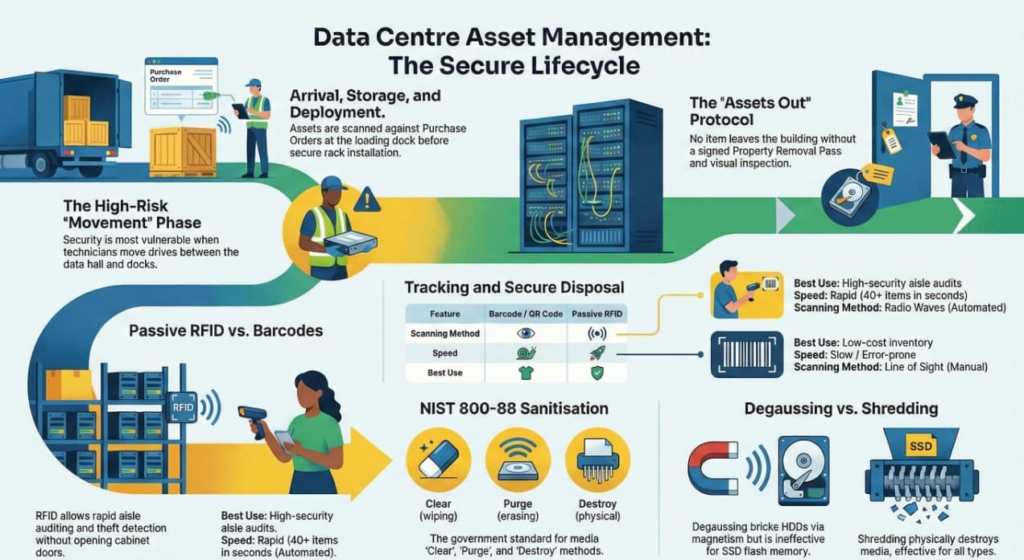
2. The Chain of Custody (Cradle to Grave)
Every critical asset (Server, Switch, Hard Drive) must have a documented owner at every second of its life.
- Arrival: The asset enters the loading dock. It is scanned and matched against a Purchase Order (PO).
- Storage: It sits in the secure staging room.
- Deployment: It is installed in Rack 4, U-position 12.
- Maintenance: It is swapped out for repair.
- Decommissioning: It is removed, wiped, and destroyed.
The Risk: The most dangerous time is during movement. If a technician walks a drive from the Data Hall to the Loading Dock, is there a record of that trip?
3. Tracking Technologies
How do we know where the servers are?
A. Barcodes / QR Codes
- How it works: Visual scan with a handheld reader.
- Pros: Cheap, simple, no batteries required.
- Cons: Line of Sight. To audit a rack, you have to open the door and physically point the scanner at every single server. It is slow and prone to human error.
B. RFID (Radio Frequency Identification)
- How it works: A small tag with an antenna responds to radio waves.
- Passive RFID: No battery. Powered by the reader’s signal. Range: ~3-5 meters.
- Active RFID: Battery-powered. Beacons its location constantly. Range: 100+ meters.
- The Data Center Use Case: We put Passive RFID tags on every server.
- Audit: A guard walks down the aisle with a wand, and it beeps 40 times in 5 seconds, confirming everything is there without opening a single cabinet.
- Theft Detection: Sensors at the door trigger an alarm if a tagged asset tries to leave the room.
4. Secure Disposal: The “End of Life”
When a hard drive fails or is retired, it still contains sensitive data. You cannot just throw it in the trash.
A. The Standard: NIST 800-88
This is the US government standard for media sanitization. It defines three methods:
- Clear: Software wipe (overwriting data with zeros). Good for reusing the drive internally.
- Purge: Magnetic erasure (Degaussing). Makes data unrecoverable.
- Destroy: Physical destruction.
B. Degaussing vs. Shredding
- Degaussing: A machine generates a massive magnetic field that scrambles the magnetic platters inside the drive.
- Result: The data is gone, and the drive is bricked (cannot be used again).
- Limitation: Does not work on SSDs (Solid State Drives) because they use flash memory, not magnets.
- Shredding: Physically grinding the drive into tiny pieces of metal.
- Result: 100% assurance for both HDD and SSD.
- Audit: You must keep the serial number of the drive and a video recording of it entering the shredder.
5. Practical Application: The “Assets Out” Check
Scenario: A technician claims they are taking a “broken fan” out to their truck.
Protocol:
- Visual Inspection: The guard asks to see the item.
- Verification: Is it really a fan? Or is it a hollowed-out fan case with four 1TB SSDs taped inside?
- The Property Removal Pass: A paper or digital form signed by the Data Center Manager authorizing this specific item to leave the building.
- No Pass = No Exit. The item stays in security custody until signed off.