Back to: Data Center Physical Security Professional
Lesson 6.1: The Security Operations Center (SOC)
1. Learning Objectives
By the end of this lesson, you will be able to:
- Define the core triad of SOC functions: Monitor, Analyze, Respond.
- Design a SOC layout that minimizes operator fatigue (Ergonomics & Lighting).
- Explain the “Black Screen” (Exception-Based) monitoring philosophy.
- Develop a standard communication protocol for dispatching guards.
2. The Role of the SOC
The SOC is not just a room with TV screens; it is an information processing hub.
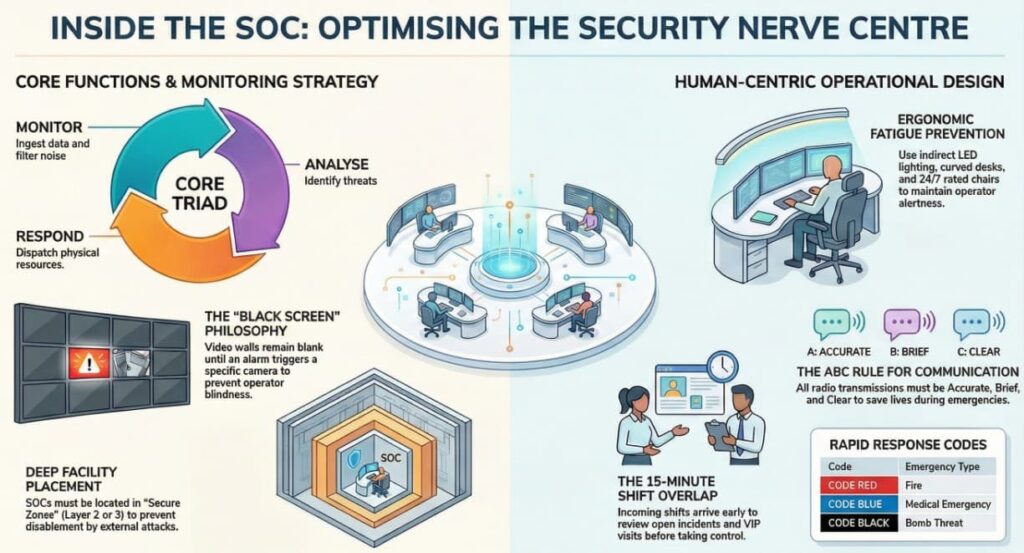
- Monitor: Ingest data from CCTV, Access Control, Fire Panels, and Intrusion sensors.
- Analyze: Filter out noise (false alarms) to identify genuine threats.
- Respond: Dispatch physical resources (Guards, Police, Fire Dept) and document the timeline.
Critical Concept: The SOC is a Secure Zone. It should be located deep within the facility (Layer 2 or 3), not next to the glass windows of the lobby where a truck bomb could disable it instantly.
3. SOC Ergonomics & Design
Operator fatigue is the biggest enemy of a SOC. If an operator is uncomfortable or blinded by glare, they will miss an alarm.
- Lighting: Indirect, dimmable LED lighting. No direct overhead lights reflecting off monitors. “Blue light” filters for night shifts.
- Console Layout: Curved desks that place all monitors within an arm’s reach.
- The “24/7” Chair: Invest in heavy-duty, 24-hour rated ergonomic chairs. Cheap chairs lead to back pain, which leads to distraction.
- HVAC: The SOC should have its own temperature control, usually kept slightly cooler (21°C / 70°F) to keep operators alert.
4. Video Wall Management: The “Black Screen” Philosophy
A common mistake is filling the video wall with 50 live camera feeds.
- The Problem: The human brain cannot process 50 moving images. After 20 minutes, “Video Blindness” sets in, and the operator sees nothing.
- The Solution: Exception-Based Monitoring (“Black Screen”).
- Normal State: The main video wall is mostly blank or shows a static map.
- Alarm State: When a door is forced or a fence sensor trips, the VMS automatically pops that specific camera onto the big screen in a red border.
- Result: The operator’s attention is drawn only to what matters.
5. Communication Protocols
In an emergency, clear communication saves lives. We use the ABC rule for radio comms:
- A – Accurate: “Subject is a male, red shirt, running north.” (Not: “Some guy is running over there!”)
- B – Brief: Keep the channel open for others.
- C – Clear: Speak slowly. Use the phonetic alphabet (Alpha, Bravo, Charlie) for spelling names or license plates.
The “Code” System: Using codes prevents panic among staff/visitors who might overhear the radio.
- Code Red: Fire.
- Code Blue: Medical Emergency.
- Code Black: Bomb Threat.
- Code Grey: Aggressive Person / Security Assist.
6. Practical Application: The Shift Handover
The most dangerous time in a SOC is the shift change (e.g., 07:00 and 19:00). Information is often lost.
The Protocol:
- Overlap: The incoming shift arrives 15 minutes early.
- The Briefing: The outgoing supervisor reviews the “Pass-On Log.”
- Open Incidents: “Door 4 is broken, maintenance is called.”
- VIPs: “The CEO is visiting at 10:00 AM.”
- Threats: “Police warned of protests downtown.”
- The Sign-Off: Both supervisors sign the log. The outgoing shift does not leave until the incoming shift confirms they have “The Con” (Control).