Back to: Data Center Physical Security Professional
0
Lesson 3.1: Authentication Factors
1. Learning Objectives
By the end of this lesson, you will be able to:
- Define the three core factors of authentication: Knowledge, Possession, and Inherence.
- Explain the difference between Single-Factor (1FA) and Multi-Factor Authentication (MFA).
- Identify the security vulnerabilities associated with standard proximity cards (cloning) versus encrypted smart cards.
2. The Three Factors of Authentication
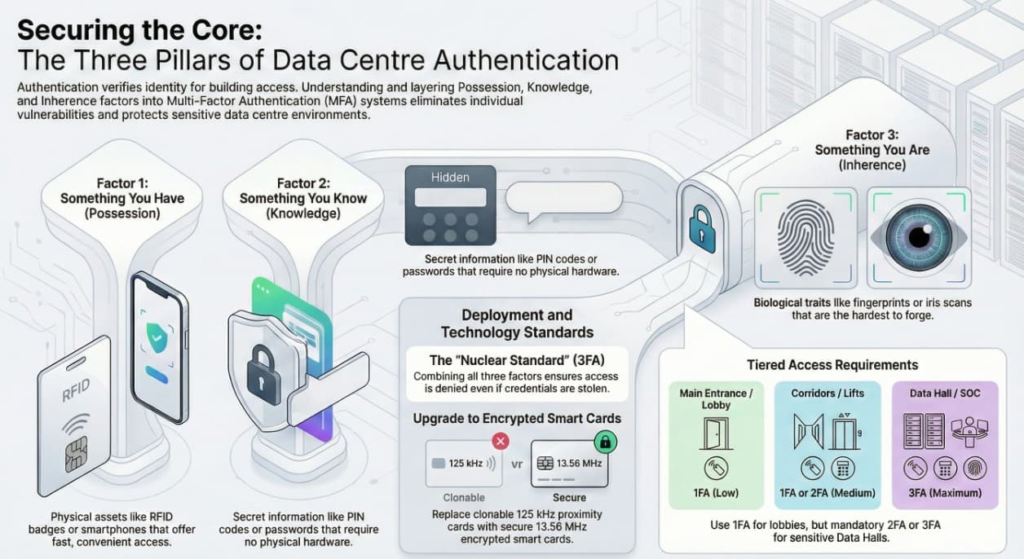
Every access control decision relies on one or more of these three pillars.
Factor 1: Something You Have (Possession)
- Examples: A physical metal key, an RFID access badge, a smartphone with NFC, or a USB token.
- The Pro: Fast and easy to use.
- The Con: It can be lost, stolen, or passed to someone else (“Passback”). If I steal your badge, the system thinks I am you.
Factor 2: Something You Know (Knowledge)
- Examples: A 4-digit PIN code, a password, or a pattern swipe.
- The Pro: No physical cost (no cards to buy).
- The Con: It can be shared easily (people tell their friends their PIN). It can be spied on (“Shoulder Surfing”).
Factor 3: Something You Are (Inherence)
- Examples: Fingerprint, Iris scan, Facial recognition, Voice print.
- The Pro: Cannot be lost, stolen, or forgotten. Hardest to fake.
- The Con: Slower throughput (takes time to scan). Privacy concerns. Higher cost.
3. Multi-Factor Authentication (MFA)
For a Data Center, Single-Factor authentication (e.g., just tapping a badge) is rarely enough for sensitive areas. We combine factors to eliminate the weaknesses of each.
- 2FA (Two-Factor): usually Card + PIN.
- Why? If I steal your badge, I still can’t get in because I don’t know your PIN. If I guess your PIN, I still can’t get in because I don’t have your badge.
- 3FA (Three-Factor): usually Card + PIN + Biometric.
- Why? This is the “Nuclear Standard.” Even if I steal your badge and torture you for the PIN, the machine knows it’s not your fingerprint.
Rule of Thumb:
- General Office/Lobby: 1FA (Card only)
- Corridors/Elevators: 1FA or 2FA
- Data Hall / MMR / SOC: Always 2FA or 3FA.
4. Technical Spotlight: Credential Technology
As a security professional, you must know that not all “beep” cards are the same.
125 kHz Proximity Cards (The “Old” Standard)
- Technology: “Prox” cards (e.g., HID Prox).
- Risk: These broadcast their ID number openly. They can be cloned in seconds using a $20 device bought on Amazon.
- Verdict: Never use these for a modern data center.
13.56 MHz Smart Cards (The “New” Standard)
- Technology: iCLASS SE, MIFARE DESFire EV2/EV3.
- Security: These cards use encryption keys. The reader and the card must “handshake” and prove they have the secret key before the ID is sent.
- Verdict: Mandatory for Tier III/IV facilities.
5. Practical Application: Designing the Flow
Scenario: Designing access for a new employee, “Jane.”
- Main Entrance (Turnstile): Jane taps her badge (1FA – Have).
- Goal: High throughput, get people in the building quickly.
- Office Door: Jane taps her badge (1FA – Have).
- Data Hall Man-Trap:
- Jane taps her badge.
- Jane enters her PIN on the keypad.
- Jane scans her iris.
- 3FA (Have + Know + Are).
- Goal: Maximum security. Speed is secondary to verification.