Back to: Data Center Physical Security Professional
0
Lesson 3.2: Biometric Technologies
1. Learning Objectives
By the end of this lesson, you will be able to:
- Interpret the critical metrics of biometrics: FAR (False Acceptance Rate) and FRR (False Rejection Rate).
- Compare the pros and cons of Fingerprint, Iris, Facial, and Vascular (Vein) scanning.
- Explain how “Template” storage works to comply with privacy laws like GDPR.
2. The Metrics: FAR vs. FRR
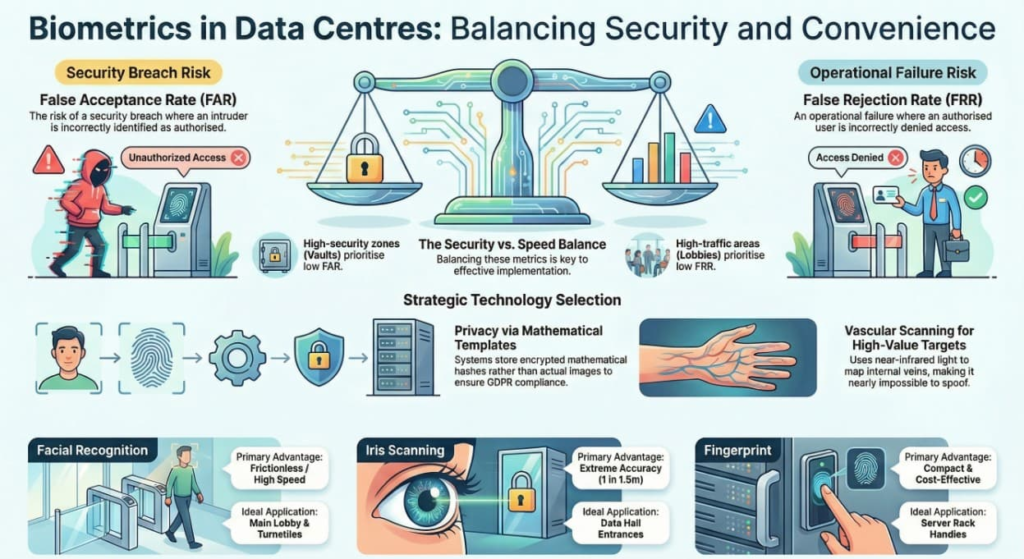
When choosing a biometric system, you are always balancing Convenience vs. Security. You cannot have 100% of both.
- False Acceptance Rate (FAR): The system incorrectly matches an intruder as an authorized user.
- Impact: Security Breach. (The bad guy gets in).
- False Rejection Rate (FRR): The system incorrectly rejects an authorized user.
- Impact: Operational Failure. (The engineer can’t fix the server).
The Trade-off:
If you make the system stricter to stop intruders (Low FAR), you inevitably reject more honest people who have dirty fingers or are standing slightly wrong (High FRR).
- Lobby Turnstiles: We accept higher FAR for lower FRR (keep the line moving).
- Vault/Data Hall: We accept higher FRR for extremely low FAR (better to annoy an employee than admit a spy).
3. Common Biometric Types
A. Fingerprint
- How it works: Scans the ridges and valleys of the finger tip.
- Pros: Cost-effective, familiar to users, compact size (fits on cabinet handles).
- Cons: Hygiene (everyone touches it). Fails if fingers are dirty, wet, or cut (common for technicians working with hardware).
- Best Use: Cabinet locks (Layer 5) or Office doors.
B. Iris Recognition
- How it works: Scans the complex, unique patterns in the colored ring of the eye.
- Pros: Extremely accurate (1 in 1.5 million error rate). Contactless (hygienic). Stable (eyes don’t change much with age/work).
- Cons: Expensive. Slower (user must stop and look).
- Best Use: The Mantrap entering the Data Hall (Layer 4).
C. Facial Recognition
- How it works: Maps nodal points on the face (distance between eyes, nose width, jawline).
- Pros: Frictionless (can scan while you walk). High throughput.
- Cons: Privacy concerns. Can struggle with masks or extreme lighting changes (though AI is improving this).
- Best Use: General building tracking and main lobby turnstiles.
D. Vascular (Palm/Finger Vein) Scanning
- How it works: Uses Near-Infrared light to map the vein structure inside your hand.
- Pros: Anti-Spoofing (requires blood flow/life). Impossible to replicate with a photo or silicone mold.
- Cons: Expensive hardware.
- Best Use: High-value targets (MMR, SOC).
4. Privacy & Data Storage (The “Template”)
A common myth is that biometric readers store a picture of your fingerprint or face. If they did, a hack would be catastrophic.
Instead, they store a Template:
- Scan: The reader takes the image.
- Algorithm: It converts the image into a mathematical string of numbers (a hash).
- Example: Your fingerprint becomes
0X1A45B...
- Example: Your fingerprint becomes
- Discard: The original image is deleted.
- Compare: When you scan your finger next time, it converts it to math and compares the numbers.
- Security Note: You cannot reverse-engineer the fingerprint image from the math string. This is critical for complying with data privacy laws.
5. Practical Application: Selection Matrix
Scenario: You have a budget to install biometrics at three locations. Which technology do you choose?
| Location | Constraint | Recommended Technology |
| Main Lobby | Thousands of people entering/exiting. Need speed. | Facial Recognition (Fast, no touching). |
| Data Hall Entrance | Highly sensitive. Technicians might have dirty hands. | Iris Scan (Contactless, ignores dirty hands, high security). |
| Server Rack Handle | Limited space. Low cost per unit needed. | Fingerprint (Small, cheap enough to put on 500+ racks). |