Back to: Data Center Physical Security Professional
Lesson 4.1: Camera Technology & Placement
1. Learning Objectives
By the end of this lesson, you will be able to:
- Contrast the tactical uses of Fixed vs. PTZ (Pan-Tilt-Zoom) cameras.
- Apply the DORI standard (Detection, Observation, Recognition, Identification) to camera selection.
- Design a camera layout specifically for server aisles to eliminate “The Corridor Effect” and blind spots.
- Explain the importance of WDR (Wide Dynamic Range) in entryways.
2. Camera Types: Fixed vs. PTZ
A common rookie mistake is to over-rely on PTZ cameras because they seem “more powerful.” In reality, they have a fatal flaw.
A. Fixed Cameras (The Workhorse)
- Function: Stares at one specific area (e.g., a door) permanently.
- Pro: It always records the event. It never misses the action because it was looking the other way.
- Con: Limited field of view.
- Best Use: Entrances, Exits, Mantraps, and Server Aisles.
B. PTZ (Pan-Tilt-Zoom) Cameras
- Function: Can rotate 360 degrees and zoom in miles away.
- Pro: Incredible for live tracking of a suspect during an incident.
- The Fatal Flaw: If the camera is looking Left, it is not recording what is happening on the Right.
- Best Use: Perimeter fence lines (used with “Slew-to-Cue”) and large parking lots.
C. Multisensor / 360° Cameras
- Function: Uses multiple lenses to stitch together a panoramic view.
- Pro: Provides total situational awareness of large open rooms without the blind spots of a PTZ.
- Best Use: The center of a large Data Hall or the SOC operations room.
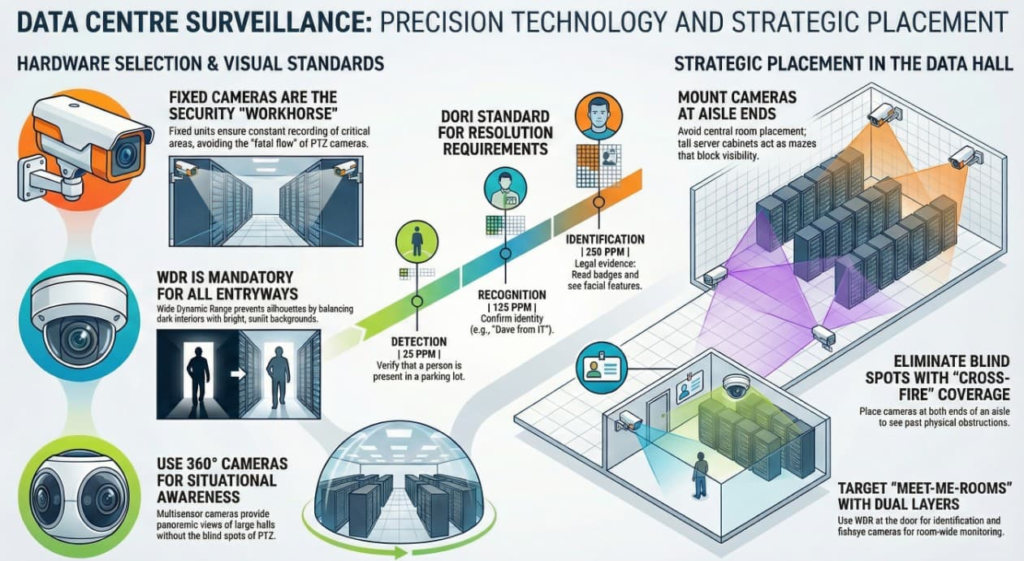
3. The DORI Standard (IEC 62676-4)
How much detail do you need? “Seeing” a person is different from “Knowing who they are.” This standard helps you choose the right resolution and lens.
- Detection (25 PPM – Pixels Per Meter): “There is a person in the parking lot.” (You can’t tell who, but you know they are there).
- Observation (62 PPM): “The person is wearing a red jacket.”
- Recognition (125 PPM): “That looks like Dave from IT.”
- Identification (250 PPM): “I can read the text on his badge and see the scar on his cheek.” (Required for legal evidence).
Application:
- Perimeter Fence: Needs Detection (Alarm triggers, guards respond).
- Server Rack / Door: Needs Identification (Must prove exactly who opened the cage).
4. Placement Strategy: The Data Hall
Securing the “White Space” (Server Hall) presents unique geometry challenges.
A. The Aisle Problem
Data halls are mazes of tall black cabinets.
- Mistake: Placing a camera in the center of the room. The cabinets block the view.
- Solution: Cameras must be placed at the ends of every aisle, looking down the corridor.
B. Cross-Coverage
Never rely on a single camera for a critical aisle. Use “Cross-Fire” placement:
- Camera A is at the North end looking South.
- Camera B is at the South end looking North.
- Result: If a technician opens a rack and blocks Camera A with their body, Camera B captures what they are doing with their hands.
5. Lighting & WDR (Wide Dynamic Range)
Cameras function like human eyes; they struggle with high contrast.
- The Problem: A dark server room with a door opening to a bright, sunlit hallway. The camera will expose for the sunlight, turning the person entering into a black silhouette.
- The Solution: WDR (Wide Dynamic Range) cameras. They take two exposures (one bright, one dark) and combine them, allowing you to see the face and the background clearly.
- Requirement: Mandatory for all exterior-facing doors and loading docks.
6. Practical Application: Design Exercise
Scenario: You are securing the “Meet-Me-Room” (MMR). It is a small 10x10ft room with one door and four racks.
Design Proposal:
- Entrance: Fixed Dome Camera, 4MP, WDR enabled. Aimed at the door (Internal side).
- Goal: Identification (Face shot) of everyone entering.
- Room Overview: Fisheye (360°) camera in the center of the ceiling.
- Goal: Total situational awareness. No blind spots behind racks.
- Rack Specific: If these are high-value racks, add a “Pinhole” camera inside the rack mesh itself.
- Goal: Monitoring physical cable tampering.