Back to: Data Center Physical Security Professional
0
Lesson 7.3: The Physical Security Audit
1. Learning Objectives
By the end of this lesson, you will be able to:
- Differentiate between an Internal Audit, an External Audit, and a Compliance Audit.
- Utilize a “Gap Analysis” methodology to compare Current State vs. Desired State.
- Conduct a functional test of critical hardware (e.g., The “Shove Test” for maglocks).
- Score audit findings using a severity matrix (Major Non-Conformity vs. Minor Non-Conformity).
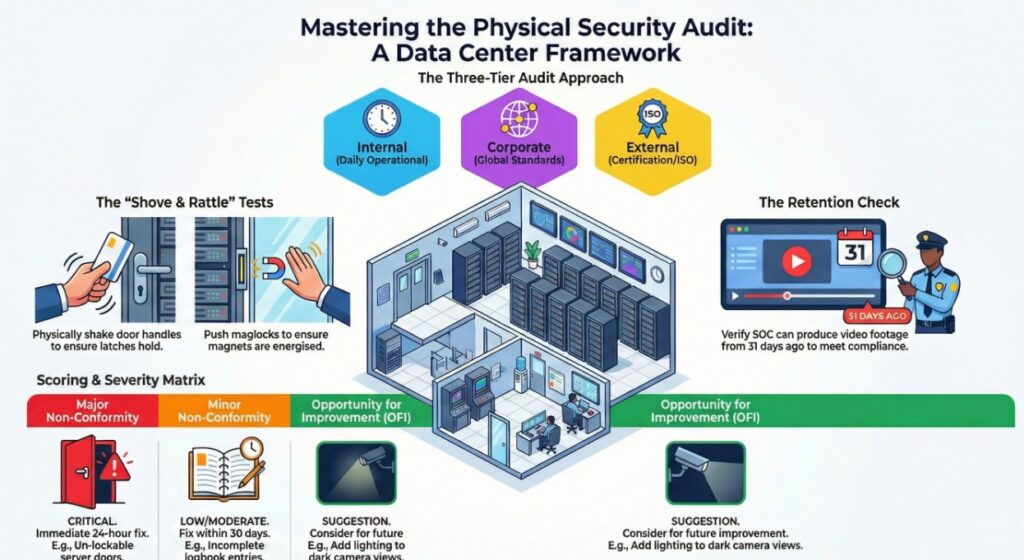
2. Types of Audits
Not all audits are the same. You need a mix of all three to stay healthy.
- The Daily/Weekly Operational Audit (Internal):
- Who: The local Security Manager.
- Scope: “Are the guards awake? Are the doors locked? Is the fence intact?”
- Goal: Immediate operational readiness.
- The Corporate Audit (Internal – HQ):
- Who: The Global Security Director visiting from Headquarters.
- Scope: “Is this site following the Global Standard?”
- Goal: Standardization across the company.
- The Third-Party / Certification Audit (External):
- Who: An ISO 27001 or SOC 2 Auditor.
- Scope: “Do you meet the legal/standard requirements to keep your license?”
- Goal: Compliance and Certification.
3. The Functional Test: Trust but Verify
An audit is not just looking at paperwork. It is physically testing the hardware.
A. The Door Test
- The Rattle Test: Shake the door handle. Does the latch hold tight, or does it wiggle? A loose latch can be “shimmed” open.
- The Closer Test: Open the door 90 degrees and let go. Does it close and latch completely on its own?
- Failure: If it stops 1 inch before latching, the door is effectively open.
- The Maglock Force Test: If it’s a magnetic lock, push with your shoulder. Is it actually energized?
B. The Camera Test
- View Verification: Call the SOC. “I am standing under Camera 4. Can you see my face?”
- Common Fail: The camera is focused on the wall, or the lens is dirty.
- Retention Check: “Show me the video of me walking in the front door 31 days ago.”
- Common Fail: “Oh, the hard drive was full, we only have 14 days.” (This is a Major Non-Conformity).
4. Scoring the Findings
When you find a problem, you must classify it so management knows what to fix first.
- Major Non-Conformity (Critical):
- A complete breakdown of a system or process.
- Example: The main server room door does not lock.
- Action: Immediate Fix required (24 hours).
- Minor Non-Conformity:
- A single lapse or a small weakness.
- Example: One visitor signed the logbook but forgot to put the “Time Out.”
- Action: Fix within 30 days.
- Observation (OFI – Opportunity for Improvement):
- Not a failure, but could be better.
- Example: “The camera view is slightly dark; consider adding a light.”
5. Practical Application: The “Walkthrough”
Scenario: You are auditing the Loading Dock.
Audit Steps:
- Check the Shutter: You press the “Close” button.
- Observation: It takes 45 seconds to close. (Risk: Tailgating).
- Finding: Observation. Recommend high-speed shutter.
- Check the Man-Door: You open the side door. It has a card reader.
- Test: You prop it open with a rock and wait.
- Expectation: After 30 seconds, a “Door Held Open” alarm should sound in the SOC.
- Result: 2 minutes pass. Silence.
- Finding: Major Non-Conformity. The alarm contacts are broken or bypassed. The SOC is blind to a breach here.