Back to: Advanced Physical Security Integration (APSI)
0
Lesson 1.2: The “Deep Defense” Strategy
Module: 1 – Foundations of Physical Security Architecture
Prerequisites: Lesson 1.1
Estimated Time: 45–60 Minutes
1. Learning Objectives
By the end of this lesson, you will be able to:
- Define the “Defense in Depth” (or Layered Security) methodology.
- Apply the “4 D’s” of physical security (Deter, Detect, Delay, Deny) to a site design.
- Categorize security devices into the appropriate layer of the “Onion” concept.
- Critique a site plan to identify single points of failure where layers are missing.
2. The Core Philosophy: The “Onion” Concept
Security is never about a single magic bullet. It is about layers. If an intruder defeats one layer, the next layer must be waiting for them. We visualize this as an onion with the Asset (what we are protecting) at the very center.
Layer 1: The Perimeter (The Property Line)
- Goal: Keep them off the property entirely.
- Technology:
- Fencing/Walls: The physical barrier.
- Lighting: High-lumen LED lighting (Deterrence).
- Gate Control: Vehicle barriers, intercoms, LPR (License Plate Recognition).
- Perimeter Detection: Radar, fence-shakers (piezo sensors), or thermal cameras.
Layer 2: The Exterior (The Building Shell)
- Goal: Alert us if they touch the building.
- Technology:
- Door Contacts (DPS): Detect if a door is pried open.
- Glass Break Sensors: Detect the acoustic frequency of shattering glass.
- Exterior Cameras: Covering entry points and blind spots.
- Access Control Readers: Regulating who can open the shell.
Layer 3: The Interior (The Hallways/Common Areas)
- Goal: Track movement towards the asset.
- Technology:
- Interior Cameras: High resolution for identification (faces).
- Motion Detectors (PIR): Covering hallways.
- Optical Turnstiles: Controlling lobby traffic in corporate offices.
- Elevator Control: Restricting floor access.
Layer 4: The Asset (The Target)
- Goal: The final hardened barrier.
- Technology:
- Vaults/Safes: Fire and tool-resistant storage.
- Server Cages: Wire mesh cages with biometric readers inside a data center.
- Asset Tracking Tags: RFID tags on laptops or art pieces that alarm if moved.
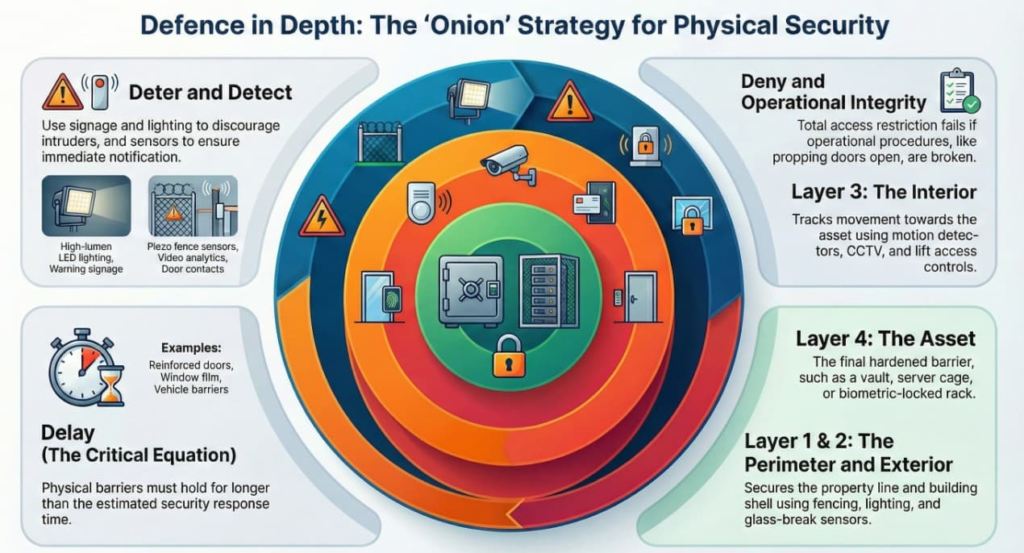
3. The “4 D’s” of Physical Security
For every layer of the onion, you must ask: What is this device doing?
- Deter: Convince the intruder to give up before they start.
- Examples: “Warning: Video Surveillance” signage, bright lighting, visible cameras, uniformed guards.
- Why: It is the cheapest form of security (Psychological warfare).
- Detect: Know that an intrusion is happening.
- Examples: Motion sensors, door contacts, video analytics.
- Crucial Note: Detection is useless without Notification. If a sensor trips but no one gets an alert, you haven’t detected anything.
- Delay: Slow the intruder down to buy time for response.
- Examples: Reinforced doors, window film (prevents glass shattering), fences, maglocks.
- The Math: $Delay Time > Response Time$. If police take 10 minutes to arrive, your barriers must hold for 11 minutes.
- Deny: Total restriction of access.
- Examples: A locked door that requires a valid credential.
4. Case Study: The “Single Point of Failure”
Scenario: A warehouse installs a $50,000 camera system but leaves the back door propped open with a brick for smokers.
- Analysis:
- Deterrence: Failed (Smokers ignore cameras).
- Detection: Failed (No door contact alarm because the system is “bypassed”).
- Delay: Zero (Door is open).
- Deny: Failed.
- Lesson: Technology cannot fix broken operational procedures. An integrator must advise the client on policies (e.g., “Door Prop Alarms”), not just sell hardware.
5. Design Challenge: The Data Center
Imagine you are designing security for a server room containing sensitive intellectual property.
- Perimeter: Install a fence with thermal cameras. (Detect + Delay)
- Exterior: Card reader on the main building entrance. (Deny)
- Interior: Optical turnstiles in the lobby to prevent “tailgating” (following someone in). (Detect + Deny)
- Asset: The server rack itself.
- Bad Design: The rack is unlocked.
- Good Design: The rack has a biometric handle (Fingerprint) and a camera pointed directly at the rack face.