Back to: Advanced Physical Security Integration (APSI)
Lesson 7.3: Network Architecture & VLANs (Security Sandboxing)
Module: 7 – Cybersecurity for Physical Security
Prerequisites: Lesson 2.3 (Switching/VLANs) & Lesson 7.2 (Device Hardening)
Estimated Time: 45–60 Minutes
1. Learning Objectives
By the end of this lesson, you will be able to:
- Design a network topology that isolates untrusted IoT devices (cameras) from critical business data.
- Configure the “Dual NIC” strategy to create a secure bridge between the camera network and the corporate office.
- Define Access Control Lists (ACLs) to strictly limit traffic flow (One-Way Trust).
- Critique the “Air Gap” method versus Logical Segmentation.
2. The Golden Rule: Isolation
In Lesson 7.1, we learned that a camera is a “computer on a pole” that hackers can physically access.
The Rule: You must assume every camera will eventually be compromised.
The Goal: If a hacker gets into Camera A, they must be trapped in a “digital jail.” They should never be able to “pivot” to the Payroll Server or the CEO’s laptop.
We achieve this through Segmentation.
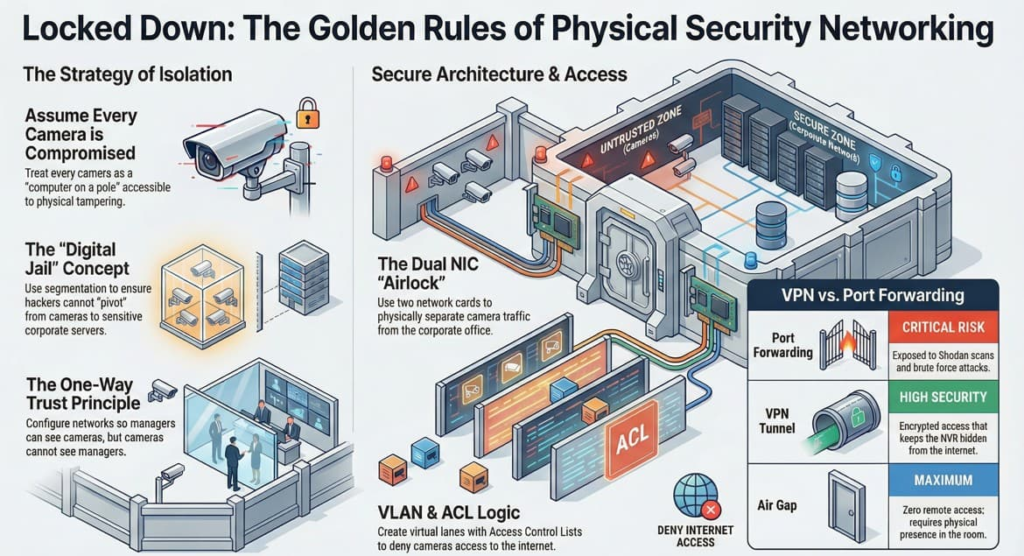
3. Architecture 1: The “Dual NIC” Strategy (The Industry Standard)
Most professional NVRs (Network Video Recorders) and Servers come with two Network Interface Cards (NICs). This is not for speed; it is for security.
How it works:
The NVR acts as an “Airlock” or a bridge between two completely separate worlds.
- NIC 1 (Camera Network):
- IP Range:
192.168.50.x - Connected to: A dedicated PoE Switch with all 50 cameras.
- Security: This network has NO Gateway. The cameras have no path to the internet and no path to the office. They can only talk to the NVR.
- IP Range:
- NIC 2 (Corporate Network):
- IP Range:
10.0.1.x(Assigned by client IT). - Connected to: The main office switch.
- Security: This allows the Security Manager to log into the NVR from their desk to view video.
- IP Range:
The Result: Even if a hacker unplugs a camera and connects their laptop to the Camera Network (NIC 1), they hit a dead end. They cannot “jump” through the NVR to attack the Corporate Network (NIC 2).
4. Architecture 2: VLAN Segmentation (Logical Separation)
If you are using a shared network infrastructure (e.g., Cisco Enterprise Switches), you don’t have physically separate switches. You use VLANs (Virtual LANs) to create logical separation.
- VLAN 10 (Corporate): Finance, HR, Wi-Fi.
- VLAN 20 (Physical Security): Cameras, Door Controllers, Intercoms.
The Router/Firewall Rules (ACLs):
By default, VLANs are separate. To make them useful, we write Access Control Lists (ACLs) in the firewall:
- The “Pin-hole” Rule:
- Allow: Client PC (VLAN 10) $\rightarrow$ NVR (VLAN 20) on Port 80/443.
- Deny: NVR (VLAN 20) $\rightarrow$ Client PC (VLAN 10).
- Result: The boss can view the cameras, but a hacked camera cannot attack the boss.
- The “No-Internet” Rule:
- Deny: VLAN 20 $\rightarrow$ WAN (Internet).
- Result: Stops cameras from “phoning home” to China or being controlled by a Botnet.
5. Architecture 3: The “Air Gap” (Nuclear Option)
Definition: A network that physically does not touch the outside world.
- Setup: Standalone switches, standalone NVR, standalone viewing monitor. No cable connects this system to the client’s internet or office LAN.
- Pros: 99.9% Secure (Hacker must be physically in the room).
- Cons: Inconvenient. You cannot view cameras from your phone or your desk. You must walk to the server room.
- Use Case: Nuclear power plants, Classified SCIFs, Casino counting rooms.
6. VPN vs. Port Forwarding (Remote Access)
Clients always ask: “I want to see my cameras from home.”
Security: The NVR is never exposed to the open internet.
Bad Way (Port Forwarding): Opening a hole in the firewall (Port 80) pointing to the NVR.
Risk: Shodan scans it. Brute force attacks start immediately.
Good Way (VPN – Virtual Private Network):
The client runs a VPN app on their phone.
This creates an encrypted tunnel into the Corporate network.
Once inside the tunnel, they can access the NVR as if they were sitting at their desk.