Back to: Advanced Physical Security Integration (APSI)
Lesson 2.2: IP Addressing & Subnetting
Module: 2 – Networking for Security Professionals Prerequisites: Lesson 2.1 (OSI Model) Estimated Time: 60 Minutes
1. Learning Objectives
By the end of this lesson, you will be able to:
- Decode an IPv4 address into its Network ID and Host ID components.
- Explain the function of a Subnet Mask and why
255.255.255.0is the most common one. - Identify the Default Gateway and why a camera needs one (and when it doesn’t).
- Calculate valid host ranges to prevent IP conflicts.
2. The IPv4 Address: The “Street Address”
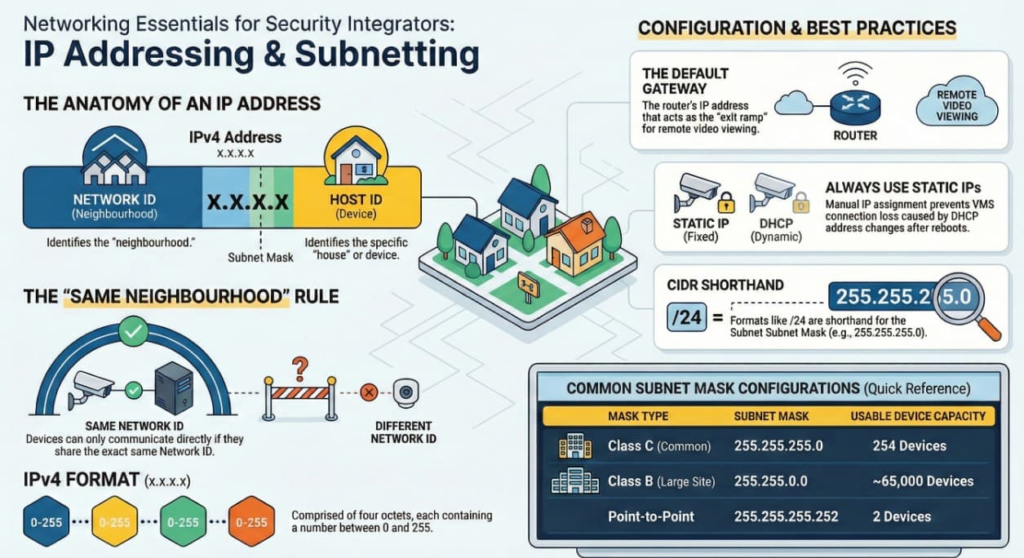
An IP (Internet Protocol) address is a logical identifier for a device on a network. Format: x.x.x.x (Four octets). Each “x” is a number from 0 to 255.
- Example:
192.168.1.50
Every IP address is split into two parts:
- Network ID: Identifies the “Neighborhood.” (e.g.,
192.168.1) - Host ID: Identifies the specific “House.” (e.g.,
.50)
Crucial Rule: Devices can only talk directly to each other if they are in the same Network ID. If they are in different Network IDs, they must pass their message to a Router (Gateway) to deliver it.
3. The Subnet Mask: The “Divider”
How does a computer know which part of the IP is the Network and which is the Host? It looks at the Subnet Mask.
The Subnet Mask is a filter.
- Wherever you see 255, that part of the IP is the Network (Must match).
- Wherever you see 0, that part of the IP is the Host (Must be unique).
Scenario A: The “Class C” Mask (Most Common)
- IP:
192.168.1.50 - Mask:
255.255.255.0 - Analysis:
- First 3 octets (
192.168.1) are the Network. Every camera must start with these three numbers. - Last octet (
.50) is the Host. You can have hosts from.1to.254. - Total usable devices: 254.
- First 3 octets (
Scenario B: The “Class B” Mask (Large Sites)
- IP:
10.5.20.50 - Mask:
255.255.0.0 - Analysis:
- First 2 octets (
10.5) are the Network. - Last 2 octets (
.20.50) are the Host. - Total usable devices: ~65,000. (Used for massive sites like airports or casinos).
- First 2 octets (
4. The Default Gateway: The “Exit Ramp”
- Definition: The Gateway is the IP address of the Router that sits on your local network.
- Function: If a camera needs to send video to a server that is not in its local neighborhood (e.g., viewing video from home, or sending video to a Cloud server), it sends the data to the Gateway.
- The Rule: The Gateway must be in the same Network ID as the camera.
- Example Configuration:
- Camera IP:
192.168.1.50 - Subnet Mask:
255.255.255.0 - Gateway:
192.168.1.1(The Router’s IP).
- Camera IP:
- Troubleshooting Tip: If a camera works locally inside the building but you cannot view it from your phone (remote access), the Gateway IP is usually missing or wrong in the camera settings.
5. CIDR Notation (The “Slash” Format)
You will often see IP addresses written like this: 192.168.1.50 /24. The /24 is just a shorthand way of writing the Subnet Mask.
- /24 = 24 bits of “Network” =
255.255.255.0(Standard) - /16 = 16 bits of “Network” =
255.255.0.0(Large Network) - /30 = 30 bits of “Network” =
255.255.255.252(Point-to-Point link, only 2 hosts allowed).
6. DHCP vs. Static IP
- DHCP (Dynamic Host Configuration Protocol):
- The camera asks the router: “Can I have an IP?” The router assigns one automatically (e.g.,
.105) with a “lease time.” - Risk: If the camera reboots, it might get a different IP (e.g.,
.106). The VMS will lose connection because it is looking for.105.
- The camera asks the router: “Can I have an IP?” The router assigns one automatically (e.g.,
- Static IP (Manual):
- The integrator manually types the IP into the camera.
- Rule: Always use Static IPs for security infrastructure. You want the camera to be at the same address forever.
- DHCP Reservation: A hybrid method where the Router is told “Always give MAC Address
00:1A...the IP192.168.1.50.” This is a best practice for managing large sites.
7. Practical Exercise: The “Subnet Check”
You are troubleshooting a system.
- Server IP:
192.168.1.10 - Camera A IP:
192.168.1.20 - Camera B IP:
192.168.5.20 - Subnet Mask (All devices):
255.255.255.0
Question: Which camera can the Server see?
- Answer: The Server can see Camera A. They share the network ID
192.168.1. - Why B fails: Camera B is in Network
192.168.5. Because the mask is255.255.255.0, the third octet must match. Since1does not equal5, they are in different neighborhoods and cannot talk without a router.