Back to: Advanced Physical Security Integration (APSI)
Lesson 6.4: PSIM (Physical Security Information Management)
Module: 6 – Unified Integration Logic Prerequisites: Lesson 6.2 (Software Integration) Estimated Time: 45–60 Minutes
1. Learning Objectives
By the end of this lesson, you will be able to:
- Define PSIM and distinguish it from a standard VMS (Video Management System).
- Explain the “Single Pane of Glass” concept for Command Centers (SOCs).
- Map a standard operating procedure (SOP) into a PSIM workflow (e.g., “Active Shooter” automated response).
- Critique the cost vs. benefit of PSIM for small vs. enterprise clients.
2. The Problem: “Swivel Chair Integration”
In a traditional security room, the guard has a problem:
- Screen 1: Video System (Milestone).
- Screen 2: Access Control (Lenel).
- Screen 3: Fire Alarm annunciator panel on the wall.
- Screen 4: Intercom system.
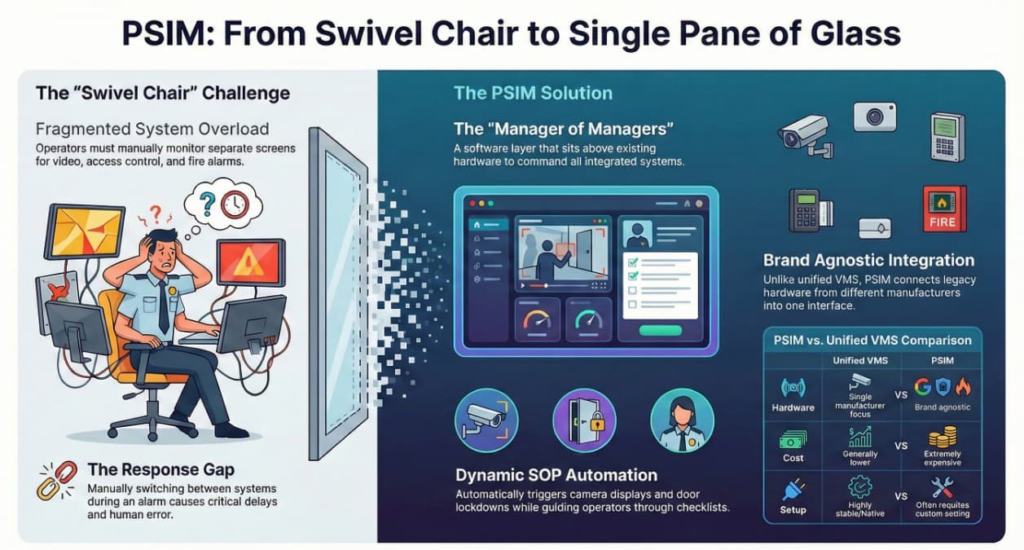
When an alarm goes off, the guard has to look at Screen 2 to see “Door Forced,” then swivel to Screen 1 to find the camera, then look at Screen 3 to check for fire. This delay causes mistakes.
3. The Solution: PSIM (The “Manager of Managers”)
PSIM is a software layer that sits on top of all the other systems. It does not record video or open doors itself; it tells the other systems to do it.
The “Single Pane of Glass”: The guard only looks at one screen (The PSIM).
- It displays a 3D Map of the facility.
- Cameras, Doors, and Sensors are just icons on the map.
4. Workflow Automation (SOPs)
The real power of PSIM is Dynamic Standard Operating Procedures. It guides the operator step-by-step.
Scenario: A “Gunshot Detection” sensor trips in the lobby.
- Without PSIM: Guard panics. Tries to find the camera. Forgets to call 911.
- With PSIM:
- Step 1 (Auto): PSIM takes over the video wall and displays the Lobby Camera.
- Step 2 (Auto): PSIM sends a “Lockdown” command to the Access Control system to lock all perimeter doors.
- Step 3 (Guide): A checklist pops up on the guard’s screen:
- Check 1: “Confirm shooter on video?” [Yes/No]
- Check 2: “Broadcast ‘Code Red’ on PA System?” [Click to Broadcast]
- Check 3: “Call 911.” (PSIM auto-dials the police).
5. PSIM vs. Unified VMS
This is a common debate.
- Unified VMS (e.g., Genetec Security Center):
- One manufacturer makes the Video and Access software.
- Pros: Cheaper, highly stable.
- Cons: You must buy their cameras and their controllers.
- PSIM (e.g., Advancis, CNL, Everbridge):
- Brand Agnostic. It can talk to a 20-year-old Honeywell alarm, a new Axis camera, and a Cisco intercom simultaneously.
- Pros: Great for taking over old buildings with mixed junk hardware.
- Cons: Extremely Expensive. Custom coding is often required for every device.
6. The “Video Wall” Controller
In a PSIM environment, we often drive massive LED walls.
- The Hardware: A specialized PC with multiple high-end GPUs.
- The Logic: The PSIM decides what goes on the wall.
- Normal Day: Marketing videos / CNN News.
- Emergency: The PSIM “seizes” the wall to show the crisis incident.