Back to: Advanced Physical Security Integration (APSI)
Lesson 10.4: Writing the Scope of Work (SOW)
Module: 10 – Product Selection & System Design Prerequisites: Lesson 9.1 (Site Survey) & Lesson 9.2 (BOM) Estimated Time: 45–60 Minutes
1. Learning Objectives
By the end of this lesson, you will be able to:
- Define the legal purpose of a Scope of Work (SOW) and how it protects you from “Scope Creep.”
- Structure a professional SOW using the “Inclusions, Exclusions, and Assumptions” framework.
- Translate a loose client request (“Secure the back door”) into a precise technical deliverable.
- Draft a “Clarifications” section to mitigate risks like asbestos, working hours, and lift availability.
2. The Purpose: Why write an SOW?
A quote tells the client what they are buying (Parts). An SOW tells the client how you will install it (Process).
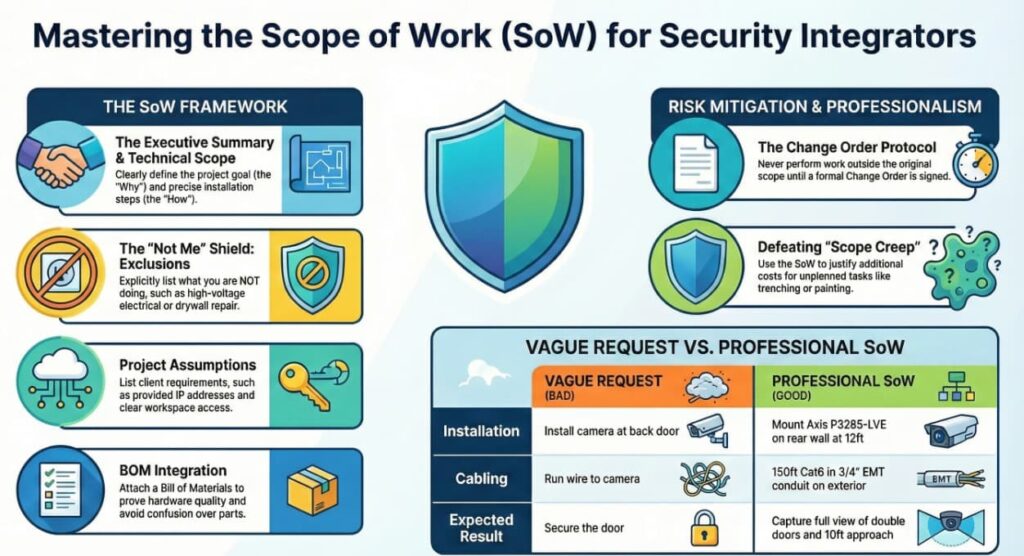
The “Scope Creep” Nightmare:
- Scenario: You quote “Install 1 Camera.” You arrive, and the client says, “Oh, while you’re here, can you just paint the pole and trench 50 feet of concrete to run the wire?”
- Without SOW: You argue or do it for free (losing money).
- With SOW: You point to the document: “The Scope explicitly excludes trenching and painting. I can send a Change Order for that additional cost.”
3. The Anatomy of a Winning SOW
A professional SOW has five distinct sections.
Section 1: Executive Summary (The “Why”)
A non-technical paragraph explaining the goal.
- Example: “To provide video surveillance coverage of the rear parking lot and loading dock to deter theft and document delivery vehicle license plates.”
Section 2: Scope of Work (The “What” & “How”)
The step-by-step technical list. Be specific.
- Bad: “Install camera at back door.”
- Good:
- “Supply and install (1) Axis P3265-LVE dome camera on the exterior rear wall, approx. 12ft high.”
- “Mount camera using (1) Axis wall arm mount with pendant cap.”
- “Run approx. 150ft of Cat6 outdoor-rated cabling from the IDF to the camera location.”
- “Cable to be run in 3/4” EMT conduit on the exterior surface; open cabling above the drop ceiling.”
- “Focus camera to capture full view of the double doors and 10ft of the approach path.”
Section 3: Project Assumptions (The “Conditions”)
What do you need from the client to succeed?
- “Client will provide a dedicated static IP address for each device.”
- “Client will provide free and clear access to the workspace between 8:00 AM and 5:00 PM.”
- “110VAC power is assumed to be available at the rack location.”
- “Existing PoE switch has sufficient power budget and port capacity.”
Section 4: Exclusions (The “Not Me”)
This is your shield. List everything you are NOT doing.
- “Excludes all high-voltage (110V/220V) electrical work.”
- “Excludes painting, patching, or repair of drywall/stucco.”
- “Excludes firewall penetrations requiring x-ray scanning.”
- “Excludes permit fees.” (Unless specifically added).
Section 5: Training & Closeout
- “Includes 1-hour operator training session for up to 3 staff members.”
- “Includes ‘As-Built’ documentation package.”
4. The “Change Order” Protocol
In construction, things change. The SOW sets the baseline so you can charge for the change.
The Trigger: If you open a wall and find asbestos, or if the client decides to move a camera 50 feet after you wired it.
The Document:
- Change Order Request (COR): A formal document stating:
- Original Scope: “Mount on wall.”
- New Scope: “Mount on pole (Client Request).”
- Cost Impact: “+$500 Labor / +$200 Material.”
- Schedule Impact: “+1 Day.”
- Rule: Do not do the work until the COR is signed.
5. The “Bill of Materials” (BOM) Integration
The SOW describes the labor; the BOM lists the parts. Always attach the BOM to the SOW so there is no confusion about model numbers.
- Tip: If you are bidding against competitors, you might hide the individual line-item pricing (bundling) but always show the part numbers. It proves you aren’t using cheap generic gear.