Back to: Advanced Physical Security Integration (APSI)
Lesson 7.4: Supply Chain Risks & Cloud Security (VSaaS)
Module: 7 – Cybersecurity for Physical Security
Prerequisites: Lesson 7.3 (Network Architecture)
Estimated Time: 45–60 Minutes
1. Learning Objectives
By the end of this lesson, you will be able to:
- Define “Supply Chain Risk” and explain the impact of NDAA/FCC bans on equipment selection.
- Compare the security models of Traditional NVRs vs. VSaaS (Video Surveillance as a Service).
- Identify Data Sovereignty risks: Where does your video actually live?
- Explain the “Zero Trust” model as applied to physical security devices.
2. The Trojan Horse: Supply Chain Security
In previous lessons, we secured the network around the camera. But what if the camera itself is the spy?
The Problem:
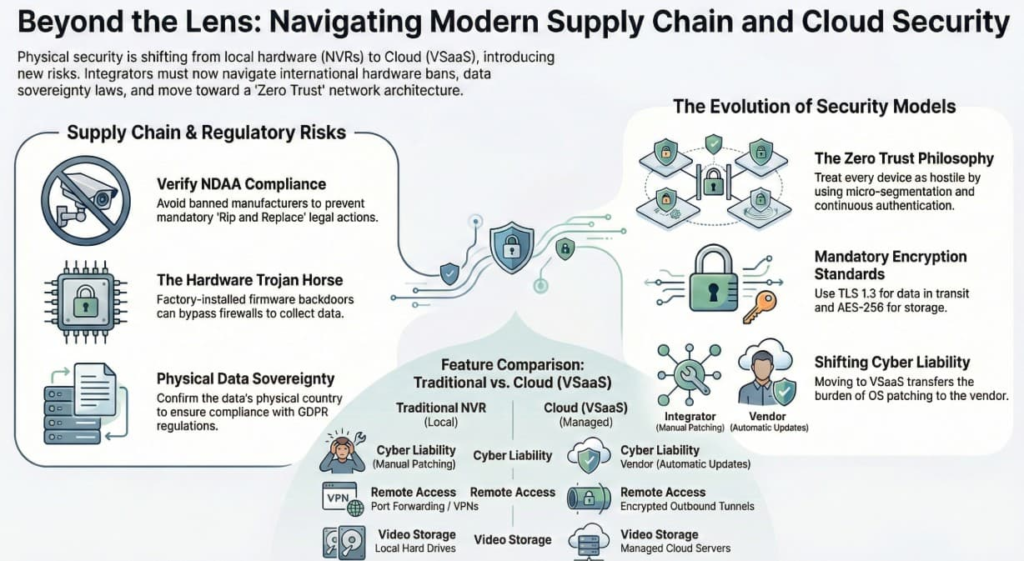
Modern cameras run millions of lines of code. It is impossible for an integrator to read it all. If a manufacturer inserts a “backdoor” into the firmware at the factory, no firewall rule in the world can stop the camera from collecting data once it connects to the internet.
The Regulation: NDAA (National Defense Authorization Act)
In the US (and increasingly followed by UK/EU/Australia), the government identified specific manufacturers (mostly comprising state-owned Chinese entities like Hikvision, Dahua, and Hytera) as national security risks.
- The Ban: Federal funds cannot be used to buy this gear.
- The Chipset: It’s not just the brand; it’s the chips inside. Many “American” brands used to re-label Hikvision cameras. This is called “OEM” (Original Equipment Manufacturer).
- Integrator’s Duty: You must verify that the equipment you install is NDAA Compliant. Installing banned gear in a government facility can lead to a “Rip and Replace” lawsuit at your expense.
3. The Shift to Cloud: VSaaS
We are moving away from the “Box in the Closet” (NVR) to the Cloud (VSaaS – Video Surveillance as a Service). This shifts the security responsibility.
| Feature | Traditional NVR | Cloud (VSaaS) |
| Video Storage | Local Hard Drive. | Amazon AWS / Azure / Vendor Cloud. |
| Cyber Liability | YOU (The Integrator). You patch the OS. | VENDOR (e.g., Verkada, Eagle Eye). They patch the OS. |
| Access Risk | Port Forwarding / VPN holes. | Encrypted Outbound Tunnel (TLS). |
| The Catch | If the internet dies, recording stops.* | Requires monthly subscription fees. |
*Note: Hybrid Cloud cameras record to an SD card if the internet fails, then upload later.
The Hidden Risk: Data Sovereignty
- Question: “Where is the cloud?”
- Scenario: You install a cloud camera for a European client. The vendor’s server farm is in the USA.
- The Violation: This might violate GDPR (General Data Protection Regulation), which restricts exporting citizen data outside the EU.
- Check: Always ask the vendor: “In which physical country does the data sit?”
4. Encryption: In Transit vs. At Rest
If you use Cloud, you are sending video over the public internet. It MUST be encrypted.
- Encryption in Transit (The armored truck):
- Video moving from Camera $\rightarrow$ Cloud.
- Standard: HTTPS / TLS 1.2 or 1.3.
- Check: If the camera uses simple RTSP (Real Time Streaming Protocol) over the internet, anyone with Wireshark can watch the video.
- Encryption at Rest (The Vault):
- Video sitting on the hard drive (Cloud or NVR).
- Standard: AES-256.
- Why: If a technician steals the hard drive from the NVR, or a hacker breaches the AWS bucket, they only see scrambled garbage data without the key.
5. The “Zero Trust” Model
The old security model was “Castle and Moat” (Trust everything inside the firewall).
The new model is Zero Trust.
The Philosophy:
“Never Trust, Always Verify.”
Even if a device is plugged into the internal secure switch, we treat it as hostile.
Implementation in Security:
- Micro-Segmentation: Every camera is in its own tiny bubble. Camera A cannot talk to Camera B.
- Continuous Authentication: The system re-checks the camera’s credentials every few minutes, not just at startup.
- Least Privilege: The NVR is allowed to read video from the camera, but it is NOT allowed to change the camera’s settings. Only the Admin PC can do that.