Back to: Advanced Physical Security Integration (APSI)
Lesson 3.4: Compression & Transmission
Module: 3 – Video Surveillance (VMS & CCTV) Prerequisites: Lesson 3.2 (Image Quality) Estimated Time: 45–60 Minutes
1. Learning Objectives
By the end of this lesson, you will be able to:
- Compare H.264 and H.265 codecs, identifying when to use each based on client hardware limitations.
- Select the correct Bitrate Mode (CBR vs. VBR) for specific network environments.
- Explain how “Smart Codecs” (like Zipstream) drastically reduce storage costs without sacrificing forensic details.
- Configure Multi-Streaming to prevent client workstations from crashing during live view.
2. The “Pipe” Problem
If you tried to send “Raw” uncompressed video from a 4K camera, it would require approximately 4 Gbps.
- A standard Cat6 cable only handles 1 Gbps.
- A hard drive would fill up in minutes.
We must “Compress” the video—throwing away redundant data to make it fit down the pipe.
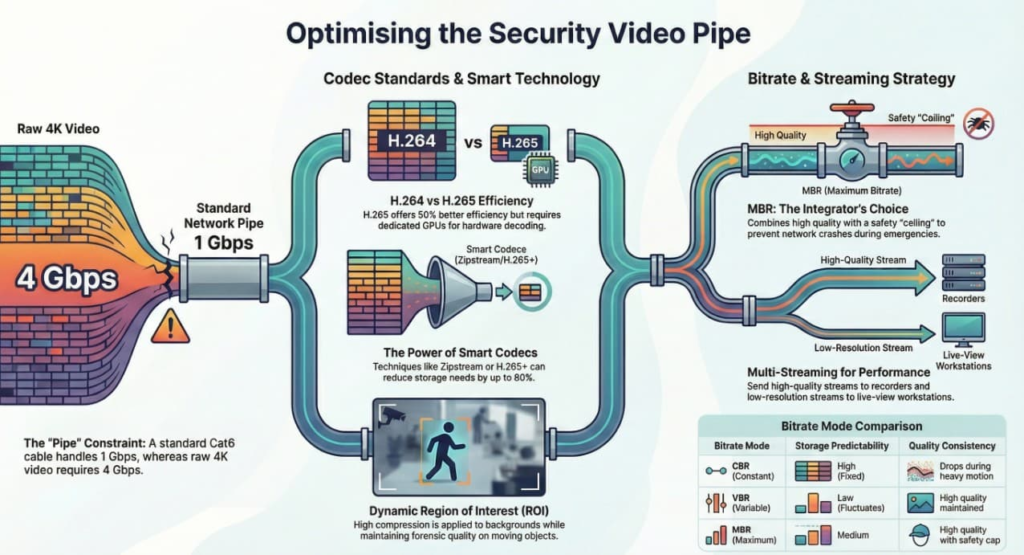
3. The Codecs: H.264 vs. H.265
A “Codec” (Coder-Decoder) is the language the camera uses to package the video.
H.264 (AVC – Advanced Video Coding)
- Status: The Industry Standard (Legacy).
- Pros: Highly compatible. Every web browser, phone, and 10-year-old laptop can play it smoothly.
- Cons: Inefficient by modern standards. Uses more bandwidth and storage.
H.265 (HEVC – High Efficiency Video Coding)
- Status: The Modern Standard.
- Pros: 50% Efficiency. A video that took 4Mbps in H.264 only takes ~2Mbps in H.265 with the same quality.
- Cons (The Trap): It requires Heavy Decoding Power.
- Scenario: A security guard tries to view 16 cameras on an old PC. If they are all H.265, the PC’s CPU hits 100%, and the video lags or crashes.
- Fix: Only enable H.265 if the viewing workstation has a dedicated Graphics Card (GPU) capable of hardware decoding.
4. Bitrate Control: CBR vs. VBR
You must tell the camera how to manage its data flow.
CBR (Constant Bit Rate)
- How it works: You force the camera: “Never exceed 4 Mbps.”
- Pros: Predictable storage calculation. You know exactly how many days of recording you will get.
- Cons: Quality drops during motion. If a bomb goes off (massive pixel change), the camera needs 10 Mbps to capture it. Since you capped it at 4 Mbps, the camera heavily compresses the image, making it blocky right when you need it most.
VBR (Variable Bit Rate)
- How it works: You tell the camera: “Maintain Quality Level 50, use whatever bandwidth you need.”
- Pros: Best possible image quality.
- Cons: Unpredictable storage. At night (no motion), it uses 0.1 Mbps. During the day, it might spike to 12 Mbps. It is hard to guarantee retention time (e.g., “30 days”).
MBR (Maximum Bit Rate / VBR with Cap)
- The Integrator’s Choice.
- Acts like VBR (low usage when quiet) but has a “Ceiling” (e.g., Cap at 6 Mbps) to prevent crashing the network during emergencies.
5. Smart Codecs (The “Secret Sauce”)
Every manufacturer has a fancy name for this: Zipstream (Axis), WiseStream (Hanwha), Smart Coding (Panasonic), H.265+ (Hikvision).
How it works: The camera analyzes the scene in real-time.
- Dynamic ROI (Region of Interest): It identifies the “background” (wall) and the “moving object” (person).
- Selective Compression: It applies high compression (low quality) to the wall and low compression (high quality) to the person.
- Dynamic GOV: If no one enters the room for 1 hour, it stops sending I-Frames entirely, dropping bandwidth to almost zero.
Result: Can reduce storage needs by 50% to 80% compared to standard H.264.
6. Multi-Streaming (Saving the CPU)
Cameras can generate multiple distinct video streams simultaneously. Using them correctly is key to system performance.
- Stream 1 (High Quality):
- Settings: 4K Resolution, 15 FPS, H.265.
- Destination: The Recorder (NVR). This is for evidence.
- Stream 2 (Low Quality):
- Settings: 720p Resolution, 10 FPS, H.264.
- Destination: Live View. When the guard views a 4×4 grid (16 cameras), the VMS automatically pulls Stream 2.
- Why: Displaying sixteen 4K streams would require a supercomputer. Sixteen 720p streams are easy.