Back to: Advanced Physical Security Integration (APSI)
Lesson 9.2: System Design & Bill of Materials (BOM)
Module: 9 – Project Management & Lifecycle Prerequisites: Lesson 9.1 (Site Survey) Estimated Time: 45–60 Minutes
1. Learning Objectives
By the end of this lesson, you will be able to:
- Construct a complete Bill of Materials (BOM) that includes “Hidden” items like licenses, mounts, and patch cables.
- Calculate storage requirements (HDD size) based on retention time, resolution, and H.265 compression.
- Audit a PoE Power Budget to ensure the switch can actually power all the devices.
- Estimate labor hours accurately by applying “Difficulty Factors” (e.g., high ceilings vs. drop ceilings).
2. The Anatomy of a BOM
A rookie quotes a camera. A professional quotes a System. If you forget one bracket or license, that money comes out of your profit margin.
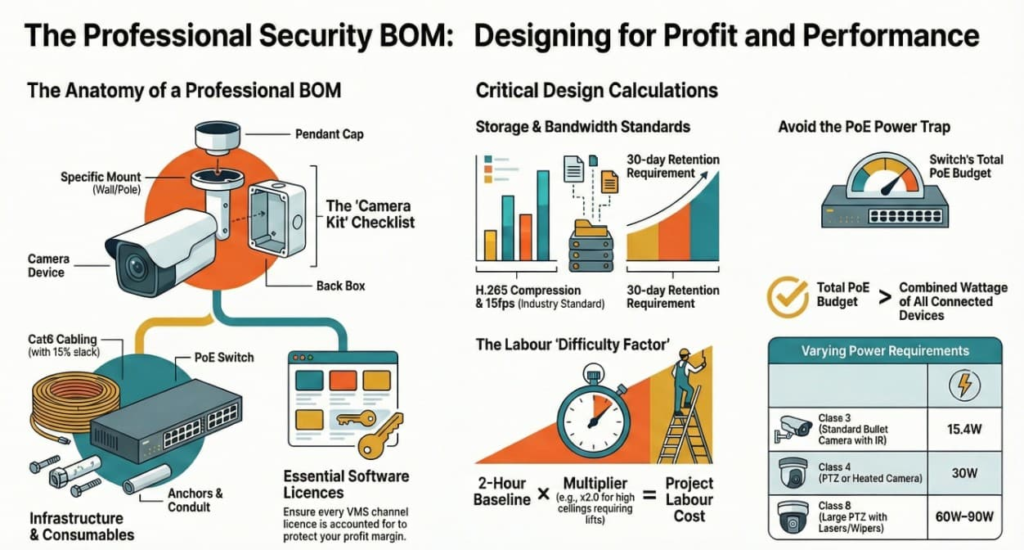
The “Camera Kit” Checklist: For every single camera location, you need:
- The Device: (e.g., 5MP IP Dome).
- The Lens: (If not built-in, usually for box cameras).
- The Mount:
- Wall Arm?
- Pendant Cap? (The adapter that connects the camera to the arm).
- Corner/Pole Adapter? (If mounting to a corner or pole).
- Back Box? (To hide the pigtail connectors).
- The License: VMS Channel License (e.g., Milestone Device License).
- The SD Card: (Optional, for Edge Recording backup).
The Infrastructure Checklist:
- Cabling: Cat6 (1000ft box). Estimate average run length + 15% slack.
- Connectors: RJ45 Jacks / Patch Panels.
- Switching: PoE Switch (Check port count AND power budget).
- Storage: NVR or Server + Hard Drives (HDD).
- Consumables: Zip ties, electrical tape, screws, anchors, conduit.
3. The Math: Storage & Bandwidth
You cannot guess hard drive size. You must calculate it.
The Formula Factors:
- Resolution: 4MP takes 2x space of 1080p.
- Frame Rate (FPS): 30fps takes 2x space of 15fps. (Standard security is 15fps).
- Compression: H.265 saves 40-50% space compared to H.264.
- Retention: How long to keep video? (Standard is 30 Days).
- Activity: Motion Only (recording 40% of the day) vs. Continuous (100%).
The Calculator:
- Scenario: 10 Cameras, 4MP, 15fps, H.265, 30 Days, 50% Motion.
- Result: You need approx. 4 TB of usable storage.
- Purchase: Buy 6 TB or 8 TB (Hard drives are formatted; a 6TB drive only gives you ~5.4TB usable, plus you need RAID redundancy).
4. The Math: PoE Budget
Just because a switch has 24 ports doesn’t mean it can power 24 cameras.
PoE Classes:
- Class 2 (7W): Fixed Domes (No IR).
- Class 3 (15.4W): Standard Bullet with IR.
- Class 4 (30W / PoE+): PTZ or Heated Camera.
- Class 8 (60W-90W / PoE++): Big PTZ with wipers/lasers.
The Trap:
- Switch: 24-Port Switch with a 180W Total Budget.
- Devices: 20 Cameras @ 10W each = 200W required.
- Result: The switch will power up the first 18 cameras. Camera 19 and 20 will stay dead.
- Fix: Check the datasheet for “Total PoE Budget” and ensure it > Total Device Wattage.
5. Estimating Labor (The “Difficulty Factor”)
Labor is the biggest risk.
Baseline:
- Simple Drop Ceiling Install: 2 Hours/Device (Run wire, mount, aim, focus).
Multipliers:
- High Ceiling (Lift Required): x 2.0 (4 Hours).
- Hard Lid (Drywall/Concrete): x 2.5 (5 Hours – requires conduit).
- Exterior Penetration: x 1.5 (3 Hours – requires drilling/sealing).
- Programming: Add 15 mins per camera for IP addressing, naming, and VMS setup.
Example Quote:
- 10 Cameras (Standard Office): 20 Hours.
- 2 PTZs (Exterior Warehouse): 8 Hours.
- Server Setup: 4 Hours.
- Total: 32 Man-Hours.
6. The “Exclusions” (Protecting Yourself)
In your design document, explicitly state what you are NOT doing.
- Example: “Quote excludes 110V electrical work. Client must provide power outlet at the rack location.”
- Example: “Quote excludes patching and painting of drywall.”
- Example: “Quote excludes scissor lift rental.”