Back to: Advanced Physical Security Integration (APSI)
Lesson 2.5: Physical Infrastructure (Cabling & Fiber)
Module: 2 – Networking for Security Professionals
Prerequisites: Lesson 2.4 (PoE)
Estimated Time: 45–60 Minutes
1. Learning Objectives
By the end of this lesson, you will be able to:
- Select the correct copper cable category (Cat5e, Cat6, Cat6A) for specific bandwidth and distance needs.
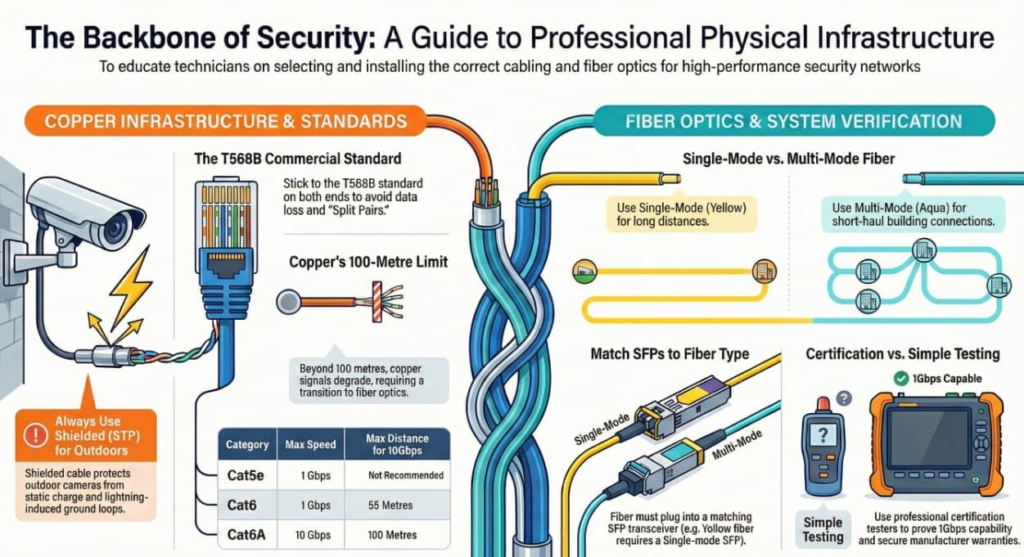
- Differentiate between T568A and T568B termination standards and avoid “Split Pairs.”
- Compare Single-Mode (OS2) and Multi-Mode (OM3/OM4) fiber optics and match them to the correct SFP modules.
- Justify the use of Shielded (STP) cable for outdoor camera installations.
2. Copper Cabling: The Backbone
While wireless exists, 99% of professional security devices rely on copper twisted-pair cabling.
A. Cable Categories
You will encounter three main types. Using the wrong one can limit future upgrades.
| Category | Max Speed | Max Frequency | Use Case |
| Cat5e | 1 Gbps | 100 MHz | Legacy/Budget. Fine for standard 2MP cameras, but phasing out. |
| Cat6 | 1 Gbps / 10 Gbps* | 250 MHz | The Standard. 1Gbps to 100m. Can do 10Gbps only up to 55m. Use for all general IP cameras. |
| Cat6A | 10 Gbps | 500 MHz | High Performance. Full 10Gbps to 100m. Thicker, harder to bend. Use for Wireless Access Points or Server Uplinks. |
B. UTP vs. STP (Outdoor Protection)
- UTP (Unshielded Twisted Pair): Standard office cable. Plastic jacket, 4 twisted pairs.
- STP/FTP (Shielded/Foil Twisted Pair): Contains a metal foil wrap and a “Drain Wire.”
- CRITICAL RULE: Always use Shielded Cable for outdoor cameras.
- Why? Wind creates static charge on the camera housing. Lightning creates ground loops. The “Drain Wire” carries this excess energy back to the switch’s ground, saving the camera from frying during a storm.
3. Termination Standards: T568A vs. T568B
Inside the cable are 8 color-coded wires. The order in which you crimp them into the RJ45 jack matters.
- T568A: (Green pair first). Often used in government/residential.
- T568B: (Orange pair first). The Commercial Standard. 90% of businesses use B.
The Golden Rule: Pick one and stick to it on both ends.
- If one end is A and the other is B, you create a “Crossover Cable” (rarely needed today).
- If you mix colors randomly, you create a “Split Pair.” The data will work at 10Mbps but fail at 1000Mbps, causing ghosting or packet loss.
4. Fiber Optics: Going the Distance
Copper dies at 100 meters (328 ft). For perimeters, parking lots, or connecting buildings, you need glass.
A. Multi-Mode (MM) – “The Short Haul”
- Core Size: Thick core (50 microns). Uses LED light.
- Color: Aqua (OM3) or Violet (OM4) jacket.
- Range: Up to ~300-400 meters for 10Gbps.
- Use Case: Connecting a camera closet to a server room within the same building. Cheaper electronics.
B. Single-Mode (SM) – “The Long Haul”
- Core Size: Tiny core (9 microns). Uses Laser light.
- Color: Yellow (OS2) jacket.
- Range: Miles (10km, 40km+).
- Use Case: Perimeter fence lines, linking separate buildings, city-wide surveillance.
- Note: While the cable is cheap, the electronics (lasers) are slightly more expensive. However, the industry is shifting to Single-Mode for everything due to its unlimited bandwidth potential.
C. The SFP (Small Form-factor Pluggable)
Fiber doesn’t plug directly into a switch. It plugs into a Transceiver (SFP) module, which then slides into the switch.
- Matching Rule: An Orange Fiber (Multi-mode) needs a Multi-mode SFP. A Yellow Fiber (Single-mode) needs a Single-mode SFP. They are not interchangeable.
5. Testing & Certification
“The light is blinking” is not a test.
- Continuity Test (The $50 Tester):
- Checks: “Did I connect Pin 1 to Pin 1?”
- Verdict: Good for basic troubleshooting, but doesn’t tell you if the cable can handle Gigabit speeds.
- Qualification (The $500 Tester):
- Checks: “Can this cable sustain 1Gbps?”
- Verdict: Great for technicians verifying a repair.
- Certification (The $10,000 Fluke):
- Checks: Crosstalk (NEXT), Return Loss, Impedance.
- Verdict: Mandatory for large projects. It generates a PDF report proving every single cable passed standards. If you don’t Certify, the manufacturer usually voids the 20-year warranty.