Back to: Advanced Physical Security Integration (APSI)
Lesson 12.3: The Commissioning Process (SAT)
Module: 12 – Implementation, Codes & Closeout
Prerequisites: Lesson 12.2 (Project Execution)
Estimated Time: 45–60 Minutes
1. Learning Objectives
By the end of this lesson, you will be able to:
- Define “Commissioning” as distinct from simply “turning it on.”
- Conduct a Site Acceptance Test (SAT) using a standardized checklist.
- Execute “Failure Mode Testing” (What happens when the power dies?).
- Perform the “Walk Test” for motion detection and AI analytics verification.
2. Commissioning vs. Installation
Installation is physical (mounting the camera). Commissioning is functional (verifying the camera meets the operational requirement).
The Reality:
Most projects fail at the 99% mark. The camera is up, the video is live, but:
- The time is wrong.
- The motion recording is set to “Continuous” (filling the hard drive).
- The night vision is blinded by a reflection.
The Goal:
To prove to the client (and yourself) that the system performs exactly as designed in the Scope of Work (Lesson 10.4).
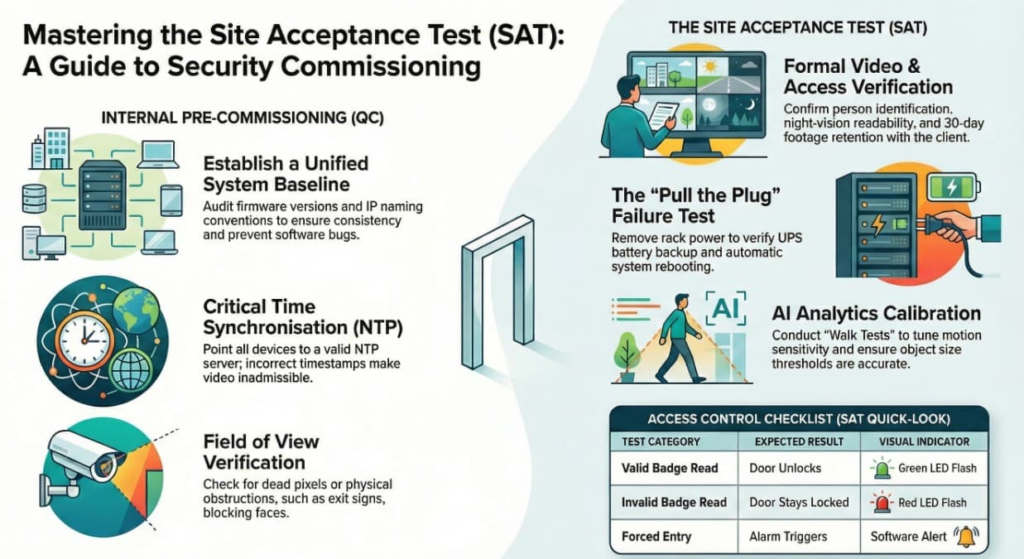
3. The Pre-Commissioning Checklist (Internal QC)
Before you invite the client for the official walk, do this yourself.
- Firmware Audit: Are all cameras on the same firmware version? (Mixing versions causes bugs).
- IP & Naming Convention:
- Bad: “Camera 1” (192.168.1.50)
- Good: “EXT-N-LoadingDock” (10.20.5.50). Match the client’s IT standard.
- Time Sync (NTP): Point all devices to a valid NTP server (e.g.,
time.google.comor the local Domain Controller). If the time is off by 5 minutes, the video is inadmissible in court. - Focus & Field of View (FOV):
- Check for “Dead Pixels.”
- Check for obstructions (Exit signs blocking faces).
4. The Site Acceptance Test (SAT)
This is the formal exam. You walk the site with the Client. You hold the clipboard. They check the box.
Section A: Video Verification
- Daytime Check: “Can we identify a person at the gate?” [Pass/Fail]
- Nighttime Check: “Is the license plate readable with IR on?” [Pass/Fail]
- Retention Check: “Show me video from 30 days ago.” (If you only have 14 days, you failed Lesson 9.2).
Section B: Access Control Verification
- Valid Read: Badge flashes Green -> Door Unlocks.
- Invalid Read: Unknown Badge -> Flashes Red -> Door stays Locked.
- Door Forced Open: Force the door without badging -> Alarm triggers in software.
- Door Held Open: Prop the door for 60 seconds -> Alarm triggers.
Section C: Failure Mode Testing (The “Pull the Plug” Test)
This is the one everyone forgets.
- Go to the Rack.
- Yank the Power Cable from the wall.
- Verification:
- Does the UPS (Battery Backup) beep?
- Do the cameras stay online?
- Does the Maglock stay locked (if battery backed) or drop immediately (if Fire code requires)?
- Restore Power: Does everything reboot and reconnect automatically without manual intervention?
5. Adjusting Analytics (The “Fine Tuning”)
AI cameras need calibration.
The Walk Test:
- Have a colleague walk through the scene.
- Motion Detection: Does the green box track them?
- Failure: If it tracks the swaying tree but misses the person, adjust “Sensitivity” and “Threshold.”
- Line Crossing: Have them cross the virtual line.
- Verification: Did the alert hit the log?
- Tuning: If it triggers on a cat, increase the “Minimum Object Size.”