Back to: Advanced Physical Security Integration (APSI)
0
Lesson 8.2: Facial Recognition & LPR (License Plate Recognition)
Module: 8 – AI & Advanced Analytics Prerequisites: Lesson 3.2 (Image Quality) & Lesson 8.1 (AI Stack) Estimated Time: 45–60 Minutes
1. Learning Objectives
By the end of this lesson, you will be able to:
- Differentiate between 1:1 Verification (Access Control) and 1:N Identification (Surveillance).
- Explain the “Nodal Point” vectoring process—how a computer turns a human face into a math problem.
- Design an LPR installation using the “30-Degree Rule” to guarantee accurate reads.
- Configure camera settings (Shutter Speed, IR) specifically for capturing fast-moving plates at night.
2. Facial Recognition (FR): The Math of Identity
Clients think FR is like looking at a photo album. It isn’t. It is geometry.
How it Works (The Pipeline)
- Detection: The AI finds a shape that looks like a face.
- Alignment: It rotates the image digitally so the eyes are level.
- Vectoring (The Magic): It measures the distance between “Nodal Points” (landmarks)—distance between eyes, width of nose, depth of eye sockets, shape of cheekbones.
- Hashing: It converts these measurements into a unique string of numbers (a “Faceprint” or Vector).
- Matching: It compares this string of numbers against the database. It does not compare pictures; it compares math.
Types of FR
- 1:1 Verification (“Am I who I say I am?”):
- Usage: Passport Control, iPhone FaceID.
- Process: You present a claim (Passport/Badge) + Your Face. The system compares your Live Face to the one Stored Face.
- Accuracy: Extremely High (99.9%).
- 1:N Identification (“Who is this person?”):
- Usage: Watchlists, Casino Blacklists, VIP Alerts.
- Process: The system compares the Live Face against a database of 10,000 faces to find a match.
- Accuracy: Lower. Prone to “False Positives” if the database is too large.
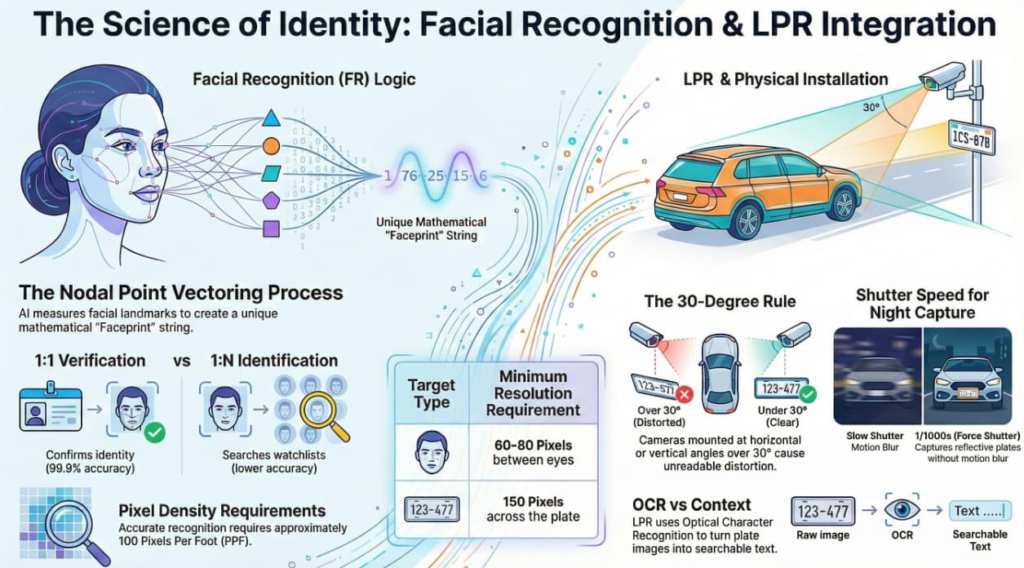
3. LPR / ANPR (Automatic Number Plate Recognition)
LPR is the “Special Forces” of the camera world. You cannot just point a normal camera at a road and expect it to work.
The Difference: Context vs. OCR
- Context Camera: Shows the car color, make, and the street (Overview).
- LPR Camera: Is zoomed in tightly on the lane. It performs OCR (Optical Character Recognition) to turn the image of the plate (“ABC-123”) into text data that can be searched in a database.
The #1 Failure: Shutter Speed
As learned in Lesson 3.2, night-time is the enemy.
- Scenario: A car drives by at 40mph at night.
- Auto Shutter: The camera slows down to capture light. result: The plate is a glowing white streak.
- LPR Setting: You MUST force the shutter to 1/1000s or 1/2000s.
- Result: The image will be pitch black except for the reflective license plate, which bounces back the camera’s IR light. This is exactly what we want.
4. The Physics of Installation
Both FR and LPR fail if the physical installation is wrong. Software cannot fix bad physics.
A. Pixel Density (Resolution)
- Face: Needs roughly 60-80 Pixels Between Eyes (approx. 100 PPF). If the face is too small, the AI cannot measure the nose width accurately.
- Plate: Needs roughly 150 Pixels Across the Plate.
B. The “30-Degree Rule” (Angle of Attack)
- Horizontal Angle: If the camera is too far to the side (>30°), the plate/face looks distorted (skewed). The AI cannot read it.
- Vertical Angle: If the camera is mounted too high (>30°), looking down, eyebrows hide the eyes, or the license plate bumper hides the text.
- Integrator’s Constraint: You cannot mount an LPR camera on a 30-foot pole 10 feet away from the car. You need to lower the camera or move it further back (telephoto lens) to flatten the angle.
5. Privacy & Ethics
As an integrator, you are the ethical gatekeeper.
- Bias: Older FR algorithms struggled with darker skin tones (low contrast). Modern AI uses IR and 3D depth to fix this, but you must test your specific hardware.
- Retention: How long do you keep the data?
- LPR: Storing the location of every employee’s car for 5 years is a privacy liability.
- Best Practice: Set automatic data purging (e.g., delete LPR data after 30 days) unless it is evidence of a crime.