Back to: Advanced Physical Security Integration (APSI)
Lesson 2.3: Switching Fundamentals
Module: 2 – Networking for Security Professionals
Prerequisites: Lesson 2.2 (IP Addressing)
Estimated Time: 45–60 Minutes
1. Learning Objectives
By the end of this lesson, you will be able to:
- Distinguish between Unmanaged and Managed switches and identify when to use each.
- Explain the purpose of a VLAN (Virtual Local Area Network) in separating security traffic from office data.
- Define “Backplane Capacity” and why it matters for high-throughput video networks.
- Utilize a managed switch interface to perform a remote camera reboot (PoE Toggle).
2. The Switch: The “Traffic Cop”
In Lesson 2.1, we learned that switches operate at Layer 2 using MAC Addresses. Unlike an old “Hub” (which shouted data to everyone), a Switch is smart. It learns which device is on which port and creates a direct, private lane for traffic between them.
But not all switches are created equal.
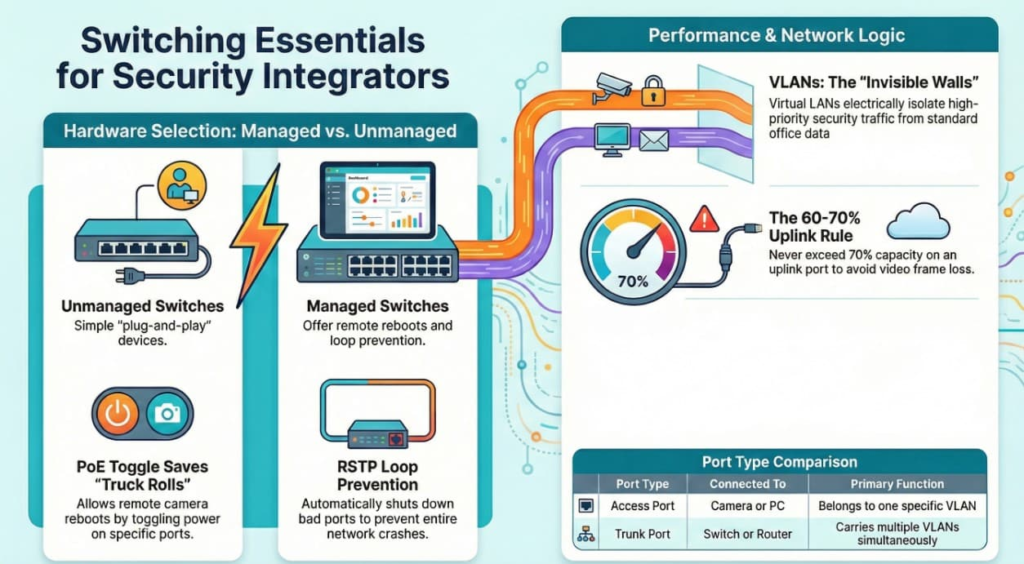
3. Unmanaged vs. Managed Switches
This is the most common hardware decision an integrator makes.
A. Unmanaged Switches (“Dumb” Switches)
- How they work: Plug and Play. You plug it in, it works. No IP address, no login page, no configuration.
- Pros: Cheap, simple.
- Cons:
- No Visibility: If a camera fails, you don’t know if the port is dead or the camera is dead.
- No Loop Prevention: If someone accidentally plugs a cable into two ports on the same switch (a “Loop”), it will crash the entire network immediately.
- Use Case: Small edges. Example: A 4-port switch inside a ceiling plenum to gather 3 nearby cameras before running one cable back to the closet.
B. Managed Switches (“Smart” Switches)
- How they work: They have an IP address and a web interface (GUI). You can log in and configure them.
- Key Features for Integrators:
- PoE Toggle (Remote Reboot): If a camera freezes (shows video but time is stuck), you can log into the switch and turn the power off/on for that specific port. This saves a truck roll.
- RSTP (Rapid Spanning Tree Protocol): Automatically detects cable loops and shuts down the bad port to save the network.
- Port Mirroring: Allows you to “copy” traffic from a specific port to your laptop for troubleshooting with Wireshark.
- Use Case: The Core switch, or any switch powering critical cameras.
4. VLANs: The “Invisible Walls”
VLAN (Virtual Local Area Network) is the most important concept for enterprise security.
The Problem:
Imagine a large office.
- Computers: Employees watching YouTube, downloading files, printing.
- Cameras: Sending constant, high-priority video streams.If you put them on the same network (“Flat Network”), a massive file download by an employee could choke the bandwidth, causing your video recording to skip frames. Furthermore, a hacker who plugs into a lobby wall jack could access your camera servers.
The Solution:
A VLAN allows you to take one physical switch and chop it into multiple virtual switches.
- VLAN 10 (Data): Ports 1–12. (For PC usage).
- VLAN 20 (Security): Ports 13–24. (For Cameras).
The Rules:
- Devices in VLAN 10 cannot see or talk to devices in VLAN 20. They are electrically isolated, even though they are on the same metal box.
- To make them talk (e.g., if the CEO wants to view cameras on his PC), traffic must go up to a Router (Layer 3), which inspects the traffic and routes it safely.
5. Switch Capacity: Throughput & Backplane
Just because a switch has “Gigabit Ports” (1000 Mbps) doesn’t mean it can handle a Gigabit on every port simultaneously.
- Backplane Bandwidth (Switch Fabric): The total speed the internal processor can handle.
- Non-Blocking Architecture: A switch that can handle max speed on all ports at once.
The Math:
You have a 24-Port Switch.
- 24 Cameras $\times$ 10 Mbps each = 240 Mbps total traffic.
- Most modern switches have a backplane of 48 Gbps.
- Verdict: Safe.
The Uplink Bottleneck:
The danger isn’t the switch processing; it’s the Uplink.
- If you have 48 cameras connecting to a switch, and that switch connects to the NVR (Recorder) via a single 1Gbps cable, you are squeezing 48 streams into one pipe.
- Rule of Thumb: Never exceed 60-70% usage on an Uplink port. If your total camera load is >600Mbps, you need a 10Gb Fiber Uplink (SFP+).
6. Field Tip: “Access” vs. “Trunk” Ports
When configuring VLANs, you will see these terms:
- Access Port: A port where you plug in a standard device (Camera, PC). It belongs to one specific VLAN (e.g., “This port is VLAN 20”). The camera doesn’t know what a VLAN is; the switch handles it.
- Trunk Port: A port that connects Switch-to-Switch or Switch-to-Router. It carries all VLANs (10, 20, 30) simultaneously so traffic can move between closets.