Back to: Advanced Physical Security Integration (APSI)
Lesson 2.4: Power over Ethernet (PoE)
Module: 2 – Networking for Security Professionals
Prerequisites: Lesson 1.3 (Ohm’s Law) & Lesson 2.3 (Switching)
Estimated Time: 45–60 Minutes
1. Learning Objectives
By the end of this lesson, you will be able to:
- Identify the three IEEE PoE standards (802.3af, 802.3at, 802.3bt) and their Wattage limits.
- Calculate a PoE Power Budget to ensure a switch can support all connected devices.
- Differentiate between “Active” (Standard) and “Passive” (Non-Standard) PoE to avoid destroying equipment.
- Troubleshoot common PoE failures, such as the “boot loop.”
2. What is PoE?
Power over Ethernet (PoE) is the technology that allows a single Cat6 cable to carry both Data (Ethernet) and Power (DC Voltage).
Why it changed the industry:
Before PoE, every camera needed two cables: one for video (Coax/Cat5) and one for power (18/2 wire from a power supply box). PoE cut the cabling labor in half and centralized power management to the switch.
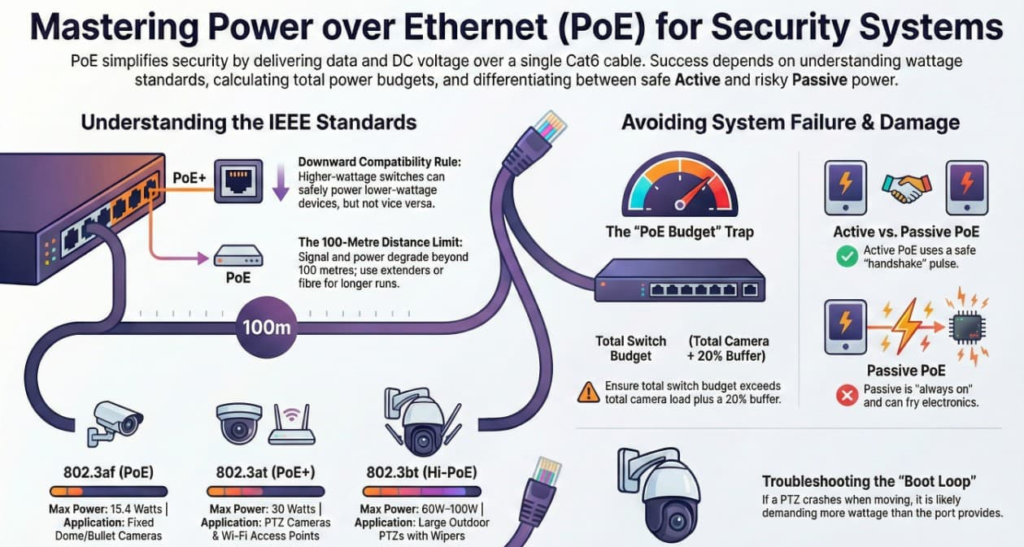
3. The Standards (The “Vocabulary”)
You must memorize these three standards. They dictate which cameras you can plug into which switch.
| Standard | Common Name | Max Power (Source) | Power at Device (After Cable Loss) | Typical Device |
| 802.3af | PoE | 15.4 Watts | ~12.95 Watts | Fixed Dome/Bullet Cameras, IP Phones, Card Readers. |
| 802.3at | PoE+ | 30 Watts | ~25.5 Watts | PTZ Cameras, Heated Enclosures, Multi-sensor Cameras, Wi-Fi Access Points. |
| 802.3bt | Hi-PoE | 60W (Type 3) 100W (Type 4) | 51W – 71W | Large Outdoor PTZs with Wipers, IR Illuminators, Digital Signage. |
The Rule of Downward Compatibility:
- A PoE+ switch (30W) CAN power a standard PoE camera (15W). The switch is smart; it only gives the camera what it asks for.
- A PoE switch (15W) CANNOT power a PoE+ PTZ (30W). The PTZ will likely power up, try to move, and then crash (reboot) when it demands more power than the switch allows.
4. The “PoE Budget” Trap
This is the most common design failure in IP video systems.
The Scenario:
You buy a 24-Port PoE+ Switch.
The datasheet says: “Supports 802.3at (30W) on all ports.”
You assume: “Great, I can plug in 24 PTZ cameras.”
WRONG.
You must look at the switch’s Total PoE Budget.
- Example Switch: Netgear 24-Port PoE+. Total Budget: 190 Watts.
- Your Plan: 24 Cameras x 15 Watts each = 360 Watts required.
The Result:
The switch will power up the first 12 cameras (12 x 15W = 180W). When you plug in Camera #13, the switch will deny power. Or worse, the switch will overheat and reboot randomly.
The Integrator’s Math:
- Sum the Max Load: Add up the max wattage of every camera (check the datasheets).
- Check the Switch Budget: Ensure Switch Budget > Total Load + 20% Buffer.
5. Active vs. Passive PoE (The Danger Zone)
Active PoE (Standard 48V)
- Smart: When you plug a cable in, the switch sends a tiny “handshake” pulse to ask: “Are you a PoE device?”
- If the device says “Yes,” the switch sends 48V.
- If the device says nothing (like a laptop), the switch sends zero power.
- Verdict: Safe. You cannot fry a laptop by plugging it into an Active PoE port.
Passive PoE (24V or 48V)
- Dumb: Commonly used by Ubiquiti microwave bridges or older wireless gear.
- Always On: It sends voltage down the line immediately, no handshake.
- The Risk: If you plug a 24V Passive PoE cable into a standard 48V camera, or vice versa, you will release the “Magic Smoke” (fry the electronics instantly).
- Rule: Never assume. Read the label. If it says “Passive 24V,” do not plug it into a standard PoE switch.
6. Extenders & Distance
Standard Ethernet/PoE has a hard distance limit: 100 Meters (328 Feet).
Beyond this, data packets degrade and power drops too low.
Solutions for Long Runs:
- PoE Extenders: Little devices placed every 100m. They are powered by the PoE coming from the switch and “regenerate” the signal to send it another 100m.
- Trade-off: They consume some power themselves (approx. 2-4 Watts), reducing what’s left for the camera.
- Fiber Optic + Media Converter: Run fiber (miles of distance) to the pole, then use a box to convert Fiber to Copper and inject power locally.
- ePoE (Extended PoE): Proprietary tech (e.g., from Dahua/Hikvision) that allows 800m runs on Cat6, but only if you use their specific switch and camera.