Back to: Advanced Physical Security Integration (APSI)
Lesson 3.5: Storage Architecture & RAID
Module: 3 – Video Surveillance (VMS & CCTV)
Prerequisites: Lesson 3.4 (Compression)
Estimated Time: 45–60 Minutes
1. Learning Objectives
By the end of this lesson, you will be able to:
- Calculate storage requirements (TB) based on bitrate and retention policies.
- Select the appropriate RAID level (RAID 5 vs. RAID 6) for NVRs.
- Justify the use of “Surveillance Grade” hard drives over standard PC drives.
- Explain “Edge Storage” and how it acts as a safety net for network failures.
2. Calculating Storage Needs
Clients usually say: “I want 30 days of recording.” To an integrator, this is a math problem.
The Variables:
- Bitrate: (Derived from Resolution + Frame Rate + Compression).
- Number of Cameras.
- Retention Time: (Days).
- Recording Mode: Continuous (24/7) vs. Motion Only.
The Formula:
Storage = Bitrate (Mbps) x Cameras x Seconds in a Day x Days
Since no one does this by hand, we use online calculators (e.g., Axis Site Designer, IPVM Calculator).
Crucial “Motion Detection” Factor:
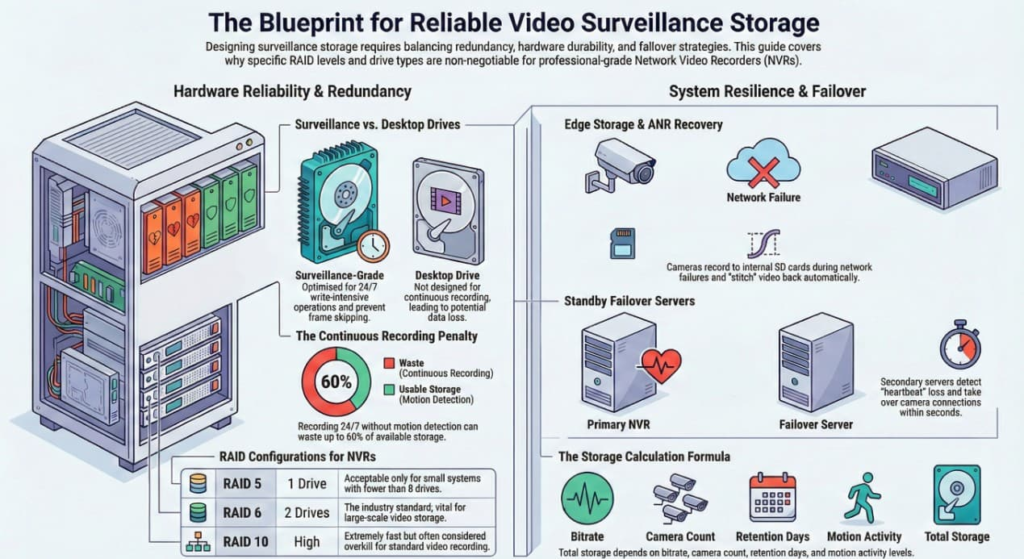
- Continuous: Records empty hallways all night. Wastes 60% of storage.
- Motion Only: Only records when pixels change.
- Conservative Estimate: Assume 40-50% activity for busy offices.
- Risk: If the motion detection sensitivity is too low, you miss the event.
3. RAID Levels (Redundant Array of Independent Disks)
Hard drives fail. It is not a question of if, but when. RAID allows you to combine multiple drives so that if one fails, you don’t lose the video.
| RAID Level | Description | Redundancy | Efficiency (Usable Space) | Integrator’s Verdict |
| RAID 0 | Striping. Splits data across drives for speed. | Zero. If 1 drive fails, ALL data is lost. | 100% | NEVER USE. |
| RAID 1 | Mirroring. Copies data to two drives identicaly. | High. 1 drive can fail. | 50% (Expensive) | Good for Operating Systems (Windows drive). |
| RAID 5 | Striping with Parity. Data + Math. | 1 Drive. | High (N-1 drives). | Okay for small systems (<8 drives). |
| RAID 6 | Double Parity. | 2 Drives. | Moderate (N-2 drives). | The Industry Standard. Vital for large NVRs because drives often fail in batches. |
| RAID 10 | Mirror + Stripe. Fast and Safe. | High (up to half). | 50% | Overkill for video, good for database servers. |
Why RAID 6 over RAID 5?
When a drive fails in RAID 5, you replace it. The system then works intensely to “Rebuild” the data. This stress often causes a second drive (which was arguably from the same manufacturing batch) to fail during the rebuild. If that happens in RAID 5, you lose everything. In RAID 6, you survive.
4. Hard Drive Hardware: “Purple” vs. “Desktop”
You cannot buy a hard drive from Best Buy/Amazon and stick it in a client’s NVR.
- Desktop Drives (Blue/Green):
- Designed to run 8 hours a day.
- Designed for “Read” operations (opening files, booting Windows).
- Surveillance Drives (WD Purple / Seagate Skyhawk):
- Designed to run 24/7/365.
- Optimized for Write operations (Video is 95% writing, 5% reading).
- Firmware prevents “Frame skipping” (It prioritizes keeping the stream flowing over error correction).
5. Failover & Edge Storage
What happens if the Server (NVR) dies or the Network cable is cut?
Edge Storage (Trickle / ANR)
- Concept: You put a microSD card inside the camera.
- Normal Operation: Camera sends video to Server.
- Network Failure: Camera detects the break and starts recording to the SD card immediately.
- Recovery (Automatic Network Replenishment – ANR): When the network returns, the VMS talks to the camera, asks for the missing video, and “stitches” it back into the timeline seamlessly.
Failover Server
- Concept: A standby server sits idle.
- Operation: If the Main Archiver crashes, the Standby Server detects the heartbeat loss and takes over the camera connections within seconds.