Back to: Advanced Physical Security Integration (APSI)
Lesson 5.1: Alarm Panel Fundamentals
Module: 5 – Intrusion Detection & Perimeter Security
Prerequisites: Lesson 1.3 (Ohm’s Law)
Estimated Time: 45–60 Minutes
1. Learning Objectives
By the end of this lesson, you will be able to:
- Identify the core components of an Intrusion Detection System (IDS): The Can, The Board, The Keypad, and The Transformer.
- Differentiate between a “Zone” (input) and a “Partition” (area).
- Wire detection loops using Normally Closed (NC) circuits with End-of-Line (EOL) resistors.
- Explain why “Double EOL” wiring is the industry standard for high-security supervision.
2. The Anatomy of an Alarm System
Unlike Access Control (which manages doors), Intrusion Detection manages Space.
- The Can (Enclosure): The metal box hidden in a closet.
- The Panel (PC Board): The brain.
- Communicator: The phone line (POTS), Cellular, or IP radio that calls the police/monitoring station.
- Aux Power: Provides 12VDC to motion sensors and glass breaks.
- Bell Output: Powers the siren.
- The Keypad (User Interface): Located at entry points. Used to Arm/Disarm.
- The Transformer: A heavy “wall wart” plug (usually 16.5 VAC) that powers the system.
- The Battery: A 12V 4Ah or 7Ah battery that keeps the system alive during power cuts.
3. Zones vs. Partitions
New technicians often confuse these terms.
- Zone: A single input point.
- Example: “Front Door Contact” is Zone 1. “Living Room Motion” is Zone 2.
- Hardwired: One pair of wires per sensor.
- Wireless: One serial number per sensor.
- Partition: A logical grouping of zones that arm/disarm together.
- Scenario: A warehouse with an office attached.
- Partition 1 (Office): Contains Zones 1-10. The secretary disarms this at 8 AM.
- Partition 2 (Warehouse): Contains Zones 11-20. This stays Armed until the shift manager arrives at 9 AM.
- Benefit: They act like two separate alarm systems running on one motherboard.
4. Wiring Logic: The “Loop”
Security sensors are switches. We monitor the state of the switch.
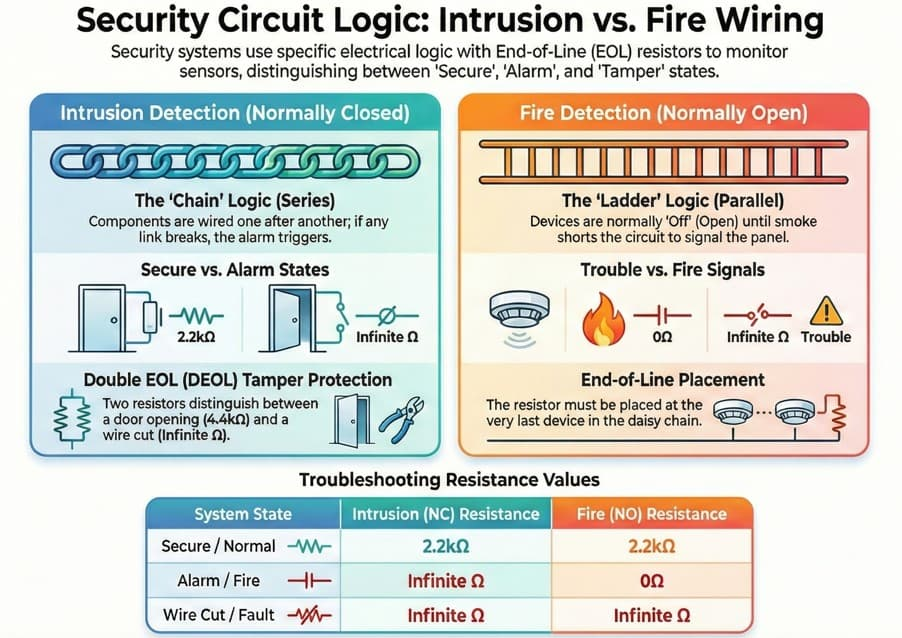
A. Normally Closed (NC) – The Standard
- State: When the door is closed (safe), the switch is Closed (circuit is complete). Current flows.
- Trigger: When the door opens (intrusion), the switch Opens (circuit breaks). Current stops.
- Why NC? If a burglar cuts the wire, the circuit breaks. The panel sees this as an “Open” and triggers the alarm.
- Contrast: If you used Normally Open (NO), cutting the wire would make the system think the door is safe forever. Never use NO for perimeter sensors.
B. End-of-Line (EOL) Resistors
If you just use a wire loop, a smart burglar can strip the wires outside the wall and twist them together (“Short” the zone). The panel will think the door is closed, even if the burglar opens it.
To fix this, we place a Resistor (e.g., 2.2k ohms) at the very end of the line (inside the sensor).
The Panel measures resistance (Ohm’s Law):
- See 2.2k ohms: “Zone is Secure (Door Closed).”
- See Infinite ohms (Open Circuit): “Zone is Violated (Door Open) OR Wire Cut.”
- See 0 ohms (Short Circuit): “Wiring Fault / Tamper.” (The burglar shorted the wires).
C. Double EOL (DEOL)
Used in banks and high-security sites. We use two resistors.
- One in Series with the switch.
- One in Parallel across the switch.
- Result: The panel can distinguish between “Door Open” (Alarm) and “Case Open” (Tamper) using only two wires.
5. Panel Programming Basics
Every zone must be assigned a Zone Type (Definition) so the panel knows how to react.
- Entry/Exit Delay:
- Use: Front Door.
- Behavior: When tripped, give the user 30 seconds to type the code before screaming.
- Instant:
- Use: Back Windows / Side Doors.
- Behavior: If opened while armed, trigger alarm immediately. No delay.
- Interior Follower:
- Use: Motion Sensors in the hallway.
- Behavior:
- If the Front Door (Delay zone) is opened first, I will wait (I assume you are walking to the keypad).
- If I am tripped without the Front Door opening first, I scream instantly (Intruder came through the window).
- 24-Hour Fire/Panic:
- Use: Smoke Detectors / Panic Buttons.
- Behavior: Active even if the system is Disarmed.