Back to: Advanced Physical Security Integration (APSI)
0
Lesson 8.1: The AI Stack (Computer Vision Fundamentals)
Module: 8 – AI & Advanced Analytics Prerequisites: Lesson 3.1 (Camera Hardware) & Lesson 7.4 (Cloud/Edge) Estimated Time: 45–60 Minutes
1. Learning Objectives
By the end of this lesson, you will be able to:
- Deconstruct the “AI Stack” into its three layers: Capture, Inference, and Action.
- Differentiate between Pixel Motion Detection (Old School) and Object Classification (New School).
- Define “Training” vs. “Inference” and why the camera only does one of them.
- Compare Edge AI (On-Camera) vs. Server AI (On-Premise) vs. Cloud AI.
2. The Evolution: From “Motion” to “Meaning”
To understand AI, you must understand what we are replacing.
- Pixel Motion (The Old Way):
- How it worked: The camera compared Frame 1 to Frame 2. If 50% of the pixels changed color, it screamed “ALARM!”
- The Failure: Trees blowing in the wind, shadows moving, or headlights passing by all change pixels. This caused 95% False Alarm rates.
- Computer Vision / AI (The New Way):
- How it works: The camera doesn’t look at pixels; it looks for Shapes and Patterns.
- The Result: It ignores the moving tree because it knows: “That is a tree, not a human.”
3. The AI Stack: How it Works
AI isn’t magic; it’s a pipeline.
Layer 1: The Model (The Brain)
- Deep Learning / CNN (Convolutional Neural Network): This is the software brain.
- Training: You feed a supercomputer 1,000,000 photos of a human. It learns what a “human” looks like (two legs, head, torso). This happens at the factory.
- Inference: You install this “trained brain” onto the camera. The camera looks at live video and guesses: “I am 98% sure that shape is a Human.”
Layer 2: The Hardware (The Muscle)
- GPU (Graphics Processing Unit): Massive power, usually in a server (NVIDIA). Used for heavy lifting (Face Recognition).
- NPU (Neural Processing Unit): A tiny, efficient chip inside the camera. Used for basic tasks (Human/Vehicle detection).
Layer 3: The Application (The Value)
- What do we do with the data?
- Security: “Alert guard if Human is in Zone A.”
- Business: “Count how many Humans entered the store (Retail Analytics).”
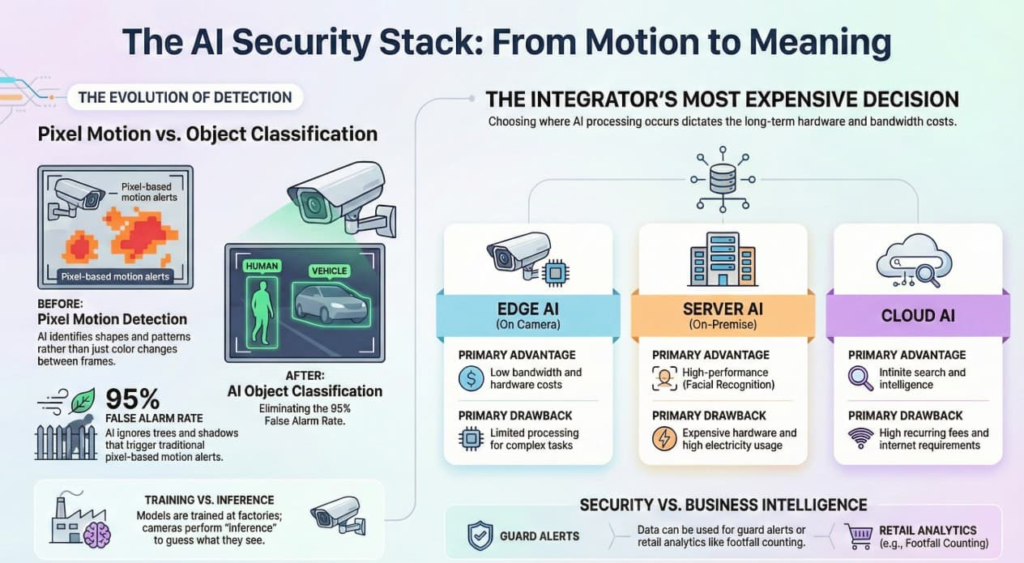
4. Deployment Architectures: Where does the AI live?
This is the most expensive decision an integrator makes.
A. Edge AI (On Camera)
- Location: The analytics run inside the camera chipset (SoC).
- Pros: Fast, Cheap (no server needed), Low Bandwidth (only sends alerts, not video).
- Cons: Limited brainpower. Can detect “Human” or “Car,” but maybe not “Steve Smith” or “2015 Toyota Camry.”
B. Server AI (On-Premise)
- Location: All video is streamed to a big server with NVIDIA GPUs in the closet.
- Pros: Smarter. Can do Facial Recognition, License Plate Recognition (LPR), and Weapon Detection simultaneously.
- Cons: Expensive. Requires $5,000+ servers and consumes massive electricity.
C. Cloud AI
- Location: Video is sent to Amazon/Microsoft/Google servers.
- Pros: Infinite intelligence. Can search for “Man in red shirt” across 1,000 hours of video in seconds.
- Cons: High recurring monthly fees. Requires massive internet upload speed.
5. Key Terminology for Integrators
- Classification: Identifying what an object is (Human, Vehicle, Animal).
- Attribute Extraction: Identifying details about the object (Red Shirt, Hat, Backpack, White Truck).
- Behavioral Analytics: Identifying actions (Loitering, Falling Down, Fighting/Fast Movement).
- False Positive: The alarm went off, but nothing was there (e.g., a scarecrow detected as a human).
- False Negative: The thief walked right past the camera, and it failed to alert. (This is worse).