Back to: Advanced Physical Security Integration (APSI)
Lesson 7.5: The IoT Ecosystem (Devices, Protocols & Security)
Module: 7 – Cybersecurity for Physical Security
Prerequisites: Lesson 7.3 (Network Architecture)
Estimated Time: 45–60 Minutes
1. Learning Objectives
By the end of this lesson, you will be able to:
- Differentiate between High-Bandwidth IoT (Cameras) and Low-Power IoT (Sensors).
- Compare lightweight protocols like MQTT and CoAP against traditional HTTP.
- Select the correct wireless standard (Zigbee, Z-Wave, or LoRaWAN) based on range and battery life.
- Identify “Shadow IoT” on a network and mitigate the risk of unmanaged devices.
2. What is IoT? (Sensors vs. Actuators)
The “Internet of Things” is just a fancy term for devices that are not computers but are connected to the network.
The Two Types:
- Sensors (Input): They gather data.
- Examples: Temperature probes, Air Quality sensors, Vibration detectors, Door contacts.
- Traffic: Very low (sending a few bytes every hour).
- Actuators (Output): They do something physically.
- Examples: Smart light bulbs, Smart locks, HVAC dampers, Water valves.
- Traffic: Bursty (waiting for a command).
The Integrator’s Challenge:
IT departments are used to “High Power” devices (Laptops, Servers). They often don’t understand how to manage a battery-powered sensor that sleeps for 23 hours a day.
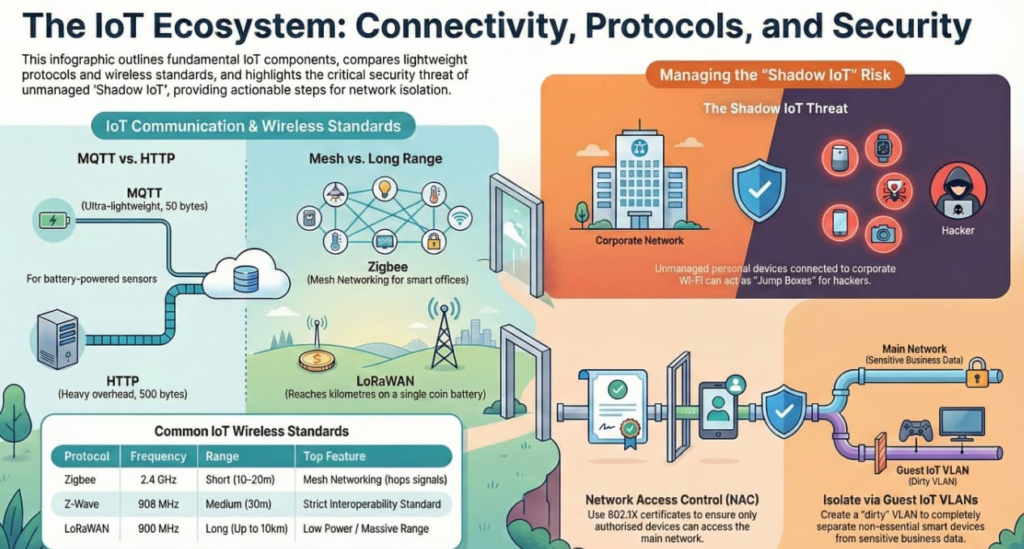
3. The Language of IoT: MQTT vs. HTTP
Why don’t smart bulbs use the same web language (HTTP) as your browser? Because HTTP is “heavy.”
HTTP (Hypertext Transfer Protocol)
- The method: “Request/Response.” The client asks, the server answers.
- The flaw: It requires a lot of overhead (headers, handshakes). Sending “Temp=70” might take 500 bytes of data. That kills the battery of a small sensor.
MQTT (Message Queuing Telemetry Transport)
- The method: “Publish/Subscribe.”
- The Sensor (Publisher) wakes up, yells “Temp=70” to a central Broker, and goes back to sleep.
- The App (Subscriber) is listening to the Broker.
- The benefit: Ultra-lightweight. The same message might only take 50 bytes.
- Use Case: The Standard for IoT. Used by almost all smart home and industrial sensors.
4. Wireless Standards: Zigbee, Z-Wave, LoRaWAN
Wi-Fi is terrible for small sensors because it uses too much power (battery dies in a week). We use dedicated IoT mesh networks instead.
| Protocol | Frequency | Range | Top Feature | Use Case |
| Zigbee | 2.4 GHz | Short (~10-20m) | Mesh Networking. Devices hop signals to reach the hub. | Smart Office lighting, Amazon Echo devices. |
| Z-Wave | 908 MHz | Medium (~30m) | Interoperability. Strict standard; all Z-Wave devices work together. | Smart Home locks and sensors. |
| LoRaWAN | 900 MHz | Long (Miles) | Low Power, Long Range. Can reach 10km on a coin battery. | Smart Cities, Parking sensors, Agriculture (Farms). |
| Wi-Fi | 2.4 / 5 GHz | Medium | High Bandwidth. | Video Doorbells, Cameras. |
5. IoT Security: The “Shadow IoT” Risk
Definition: “Shadow IoT” refers to devices employees bring to work and connect to the Wi-Fi without IT knowing.
The Nightmare Scenario:
- An employee brings a cheap “Smart Aquarium Feeder” to their desk because they are going on vacation.
- They connect it to the corporate Wi-Fi using the password written on the whiteboard.
- The Feeder has zero security and a hard-coded password.
- The Breach: A hacker scans the network, finds the Feeder, compromises it, and uses it as a “Jump Box” to attack the Payroll Server.
The Fix:
- Network Access Control (NAC): As learned in Lesson 7.2 (802.1X). If the device doesn’t have a certificate, it doesn’t get on the main network.
- Guest IoT VLAN: Create a “Dirty” VLAN just for Alexa, Smart Fridges, and Fish Feeders. Isolate it completely from the business data.