Back to: Advanced Physical Security Integration (APSI)
0
Lesson 11.4: Project Closeout & Handover
Module: 12 – Implementation, Codes & Closeout Prerequisites: Lesson 12.3 (Commissioning/SAT) Estimated Time: 45–60 Minutes
1. Learning Objectives
By the end of this lesson, you will be able to:
- Compile a professional “Closeout Package” that satisfies General Contractor (GC) requirements.
- Create “As-Built” drawings (Redlines) that reflect the actual reality of the install, not just the plan.
- Draft a Warranty Letter that strictly defines the start and end dates of your liability.
- Execute the “Training Sign-Off” to prevent future “User Error” service calls from being unpaid.
2. The “Retainage” Trap
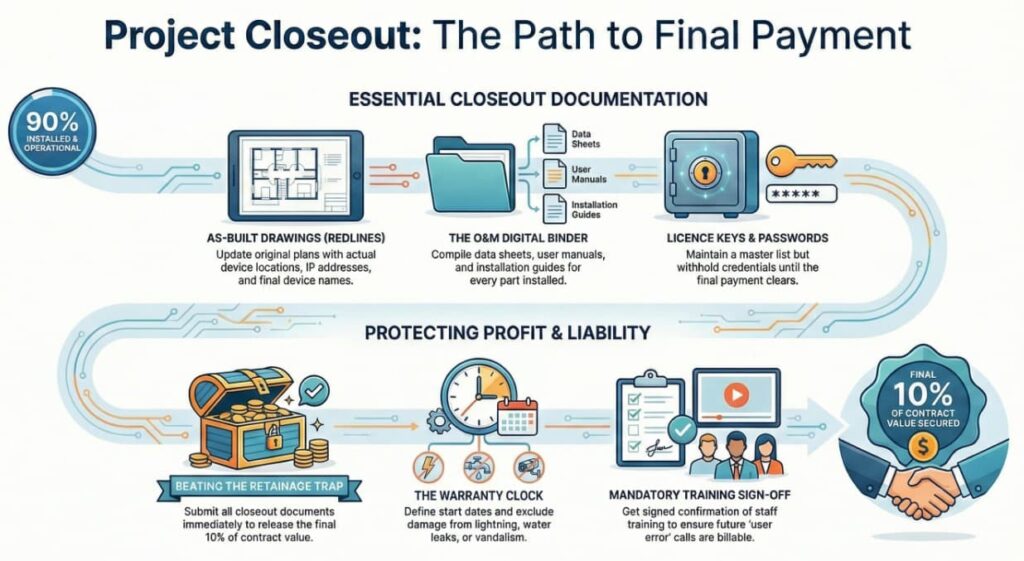
In commercial construction, the client usually holds back 10% of the total contract value until the very end. This is called Retainage.
- The Trap: You finished the work 3 months ago, but you haven’t been paid that final $10,000.
- The Reason: You haven’t submitted your Closeout Documents.
- The Rule: No Docs = No Money.
3. The “As-Built” Drawings (Redlines)
The original design drawings are rarely accurate. During construction, you moved cameras, rerouted cable around ducts, and added devices.
- What to do: Take a red pen to the original printed floor plans.
- Cross out the original camera location.
- Draw the new location where you actually installed it.
- Write the final IP Address and Device Name next to the icon.
- The Deliverable: Scan these redlined drawings or update them in CAD/Bluebeam. This is the “As-Built.”
- Value: 3 years from now, when a camera dies, the service tech knows exactly where to find it in the ceiling.
4. The O&M Manuals (Operations & Maintenance)
The General Contractor requires a digital binder containing:
- Data Sheets: The PDF spec sheet for every part installed (Camera, Reader, Power Supply, Cable).
- Manuals: The User Manual (how to use it) and Installation Manual (how to fix it).
- Software Keys: A printed sheet with the License Keys and the “Master Password” list (unless stored in a secure credential manager).
- Warning: Never hand over the Master Passwords until the final payment clears.
5. The Warranty Letter
You must define the “Clock.”
- Start Date: Usually the date of “Substantial Completion” (when the SAT was signed).
- End Date: Exactly 1 year (or 3 years) from that date.
- Scope: “Warranty covers defects in materials and workmanship. It excludes damage caused by lightning, water leaks, vandalism, or ‘Acts of God’.”
- Why: If lightning strikes the building in Month 11, you don’t want to replace $50,000 of fried cameras for free.
6. The Training Sign-Off
Clients often forget how to use the system, then call you claiming “It’s broken.”
The Protocol:
- Conduct a 1-hour training session with the staff.
- Teach: How to Search, Playback, and Export video.
- Teach: How to add/delete a cardholder.
- The Sign-Off Sheet: Have every attendee sign their name on a document that says:
- “I have received training on the system operation and understand the basic functions.”
- The Result: When they call 2 months later saying, “I don’t know how to export video,” you can charge them a Billable Service Call for re-training, referencing their signature.
7. Quiz: Check Your Understanding
- Documentation: You finish a job and send the invoice. The General Contractor rejects it, asking for “Redlines.” What are they looking for?
- Finance: The client calls you six months after the job, angry that a camera was smashed by a delivery truck. They demand you replace it under warranty. What clause in your Warranty Letter protects you?
- Process: Why should you withhold the “Master Administrative Password” until the final Retainage payment hits your bank account?